If you’ve ever sent a client the wrong document at the wrong time, you’re not alone.
Invoices and receipts are two of the most commonly confused documents in small business life, and mixing them up can create real headaches, from chasing payments that have already been made to confusing clients who just wanted a simple confirmation of purchase.
The good news? Once you understand what each document does and when to use it, the whole thing becomes second nature.
This guide breaks down exactly what invoices and receipts are, how they differ and when to send each one, with real-world examples tailored to service-based businesses.
You’ll also learn how to automate the whole process so you’re not manually creating documents every time a client pays.
What Is an Invoice?
An invoice is a formal request for payment.
You send it to a client before (or sometimes at the point of) receiving money. It tells them exactly what they owe you, why they owe it and when you need to be paid.
Think of it as a legally binding record of the transaction in progress.
It creates an obligation on the client’s end and forms part of your accounts receivable until payment clears.
A standard invoice typically includes:
- Your business name and contact details
- The client’s name and contact details
- A unique invoice number (for tracking and reference)
- Invoice date and payment due date
- An itemized list of services or products with quantities and rates
- Subtotal, taxes and total amount due
- Payment instructions (bank transfer details, accepted payment methods)
Invoice Example
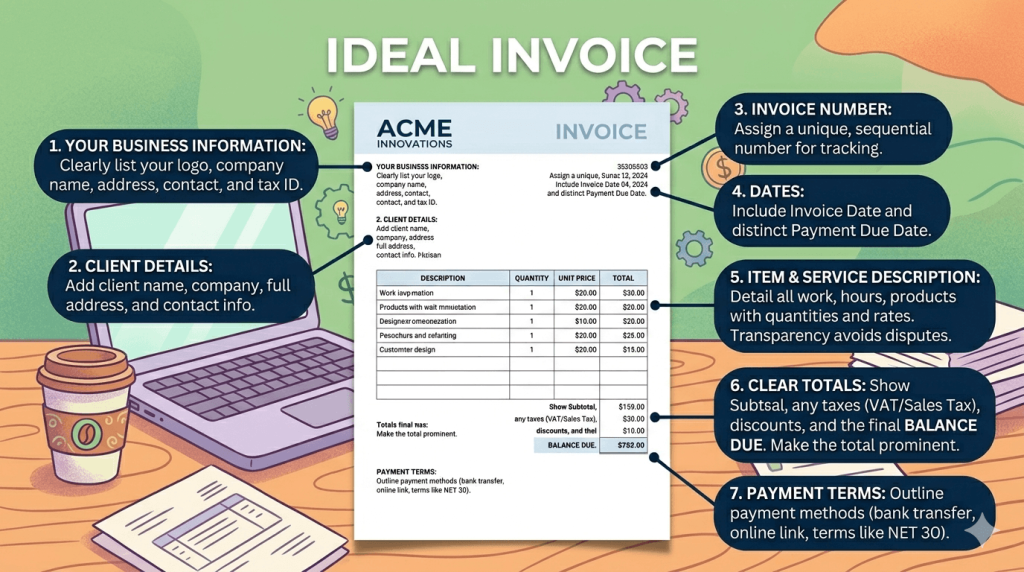
Say you run a small marketing agency and you’ve just completed a website copy project for a client.
Once the work is done, you send an invoice like this:
Business Address and Logo
Invoice #1042 Date: June 1, 2025 Due: June 15, 2025
- Website copywriting (10 pages) — $150/page — $1,500.00
- SEO metadata — $200.00
Total due: $1,700.00 Payment via bank transfer to: [account details]
Full payment within 28 days.
That invoice kicks off the payment process. It’s a request, not a confirmation.
What Is a Receipt?
A receipt is a confirmation that payment has been made.
You issue it after money has changed hands and it serves as proof of purchase for the client and a record of income for you.
Receipts don’t ask for anything. They simply acknowledge that a transaction has been completed.
A standard receipt typically includes:
- Your business name and contact details
- The client’s name
- Receipt number and date of issue
- Description of goods or services paid for
- Transaction details like amount paid and payment method
- Reference to the original invoice (if applicable)
- Return and support policy (if applicable)
Receipt Example
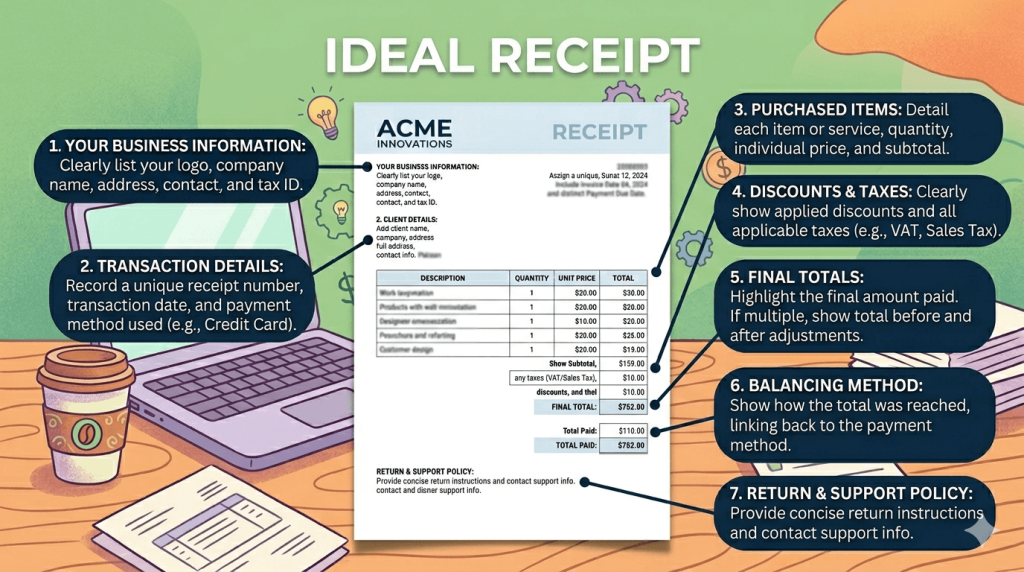
Using the same agency scenario, once your client pays the $1,700.00 invoice, you send a receipt like this:
Business Address and Logo
Receipt #R-1042 Date: June 14, 2025
Received from: [Client Name]
For: Website copywriting and SEO metadata
Amount paid: $1,700.00
Payment method: Bank transfer
Reference: Invoice #1042
Payment received in full. Thank you!
Clean, simple and unambiguous. The transaction is done.
Invoice vs Receipt: Key Differences
Here’s a side-by-side look at how the two documents compare:
| Invoice | Receipt | |
| Purpose | Requests payment | Confirms payment received |
| Timing | Sent before payment | Sent after payment |
| Obligation created | Yes, client owes money | No, transaction is complete |
| Includes payment terms | Yes | No |
| Proof of purchase | No | Yes |
| Used in accounts | Accounts receivable | Income records |
The simplest way to remember it is that an invoice says “you owe me,” and a receipt says “you paid me.”
It’s also worth noting that invoices and receipts serve different purposes at tax time.
Your invoices help you track what’s owed and what’s outstanding.
Your receipts provide evidence of income you’ve actually received, which is what the tax authorities (or your accountant) want to see.
When Should You Send an Invoice?
Send an invoice whenever you’ve agreed to payment terms, and you need to formally request money from a client.
The timing depends on how your business is structured.
Common scenarios for sending an invoice:
- Project completion: You finish a branding project and send the invoice the same day. SureForms can automatically trigger a PDF invoice the moment a client submits a project sign-off form, so nothing falls through the cracks.
- Milestone billing: You’re managing a long-term content retainer and invoice at the end of each month for work completed. With SureForms, you can build a simple form that generates and sends a recurring invoice PDF without you touching a thing.
- Upfront deposits: You require a 50% deposit before starting work. You send a deposit invoice at the point of booking and SureForms can generate it automatically when the client fills in your onboarding form.
- Retainer agreements: You bill a fixed monthly fee for ongoing services like social media management or consulting. Automating this with SureForms means your client gets a professional, consistent invoice every cycle.
As a general rule, don’t wait too long after completing work to invoice.
The longer you leave it, the more awkward the conversation becomes and the slower your cash flow gets.
When Should You Send a Receipt?
Send a receipt every time you receive a payment, without exception.
It’s good practice, it protects both parties and it’s legally required in some jurisdictions.
Common scenarios for sending a receipt:
- Full payment received: A client pays your invoice in full. Issue a receipt the same day, confirming the amount, method and reference.
- Deposit paid: A client pays your 50% upfront fee. Issue a receipt for the deposit so they have a record and reference the remaining balance due.
- Partial payment: Occasionally, clients pay in installments. Issue a receipt for each payment and note what’s still outstanding.
- Immediate payment: Some clients pay at the point of booking, especially for workshops, consultations, or one-off services. In this case, you might skip the invoice entirely and go straight to a receipt.
Immediate payment is where SureForms really earns its keep.
You can build a form that accepts payment and automatically generates a receipt PDF the moment someone submits it, all without manual input on your end.
One important note: if you’re using invoicing software that marks invoices as “paid,” that doesn’t automatically constitute a receipt from the client’s perspective.
A separate receipt document is always cleaner and more professional.
How To Generate Automatic PDF Invoices or Receipts from Form Entries
Creating invoices and receipts manually is one of those tasks that feels quick but adds up fast.
Once you’re managing multiple clients, it becomes a real drain on time you could spend on billable work.
SureForms lets you automate the whole process directly inside WordPress.
You can build smart forms for client onboarding, project sign-off, or payment confirmation, and configure them to automatically generate a PDF invoice or receipt the moment someone submits.
Here’s a quick look at how it works in practice 👇
Step 1: Build Your Form
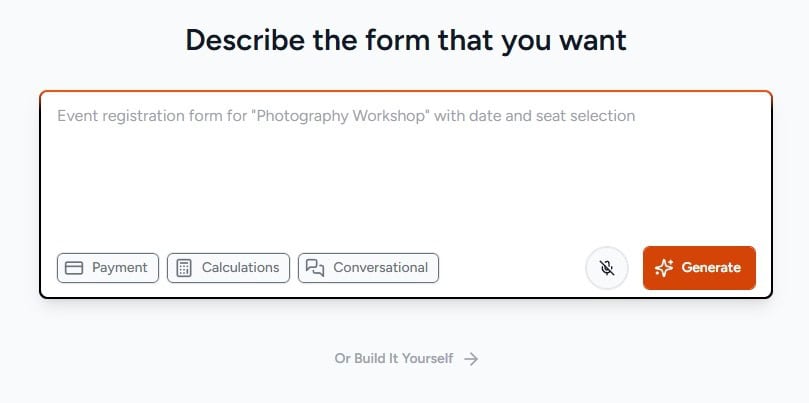
Use SureForms’ AI or the drag and drop builder to create a form that captures the information you need: client name, project details, services rendered, amount, payment method, and anything else relevant to your invoice or receipt.
You can also create a Payment Form with SureForms to accept payments using Stripe & PayPal, and handle everything in one place, from accepting payments to automatically sending receipts, all with a single plugin.
Step 2: Map Your Fields to a PDF Template
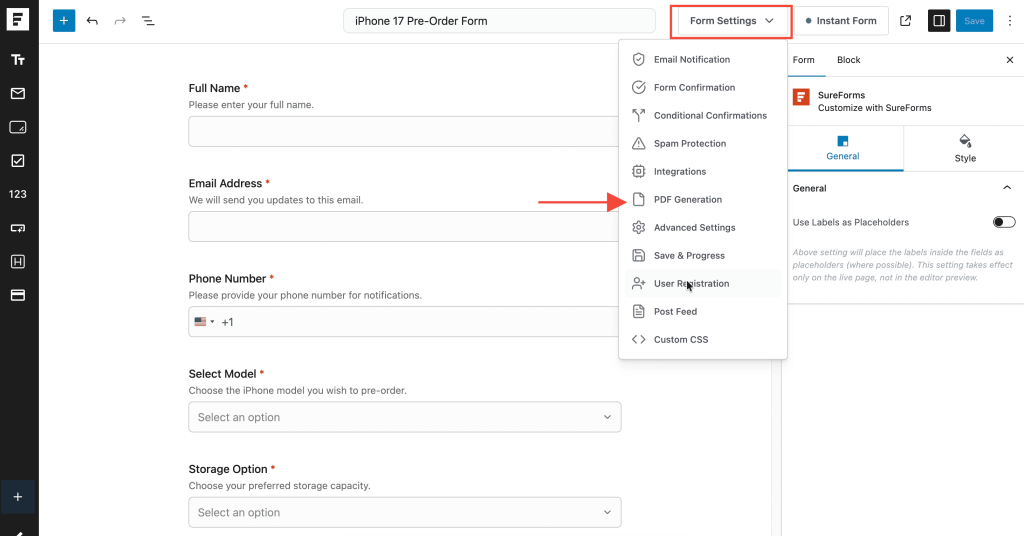
Connect your form fields to a pre-designed PDF template using SureForms’ PDF generation feature.
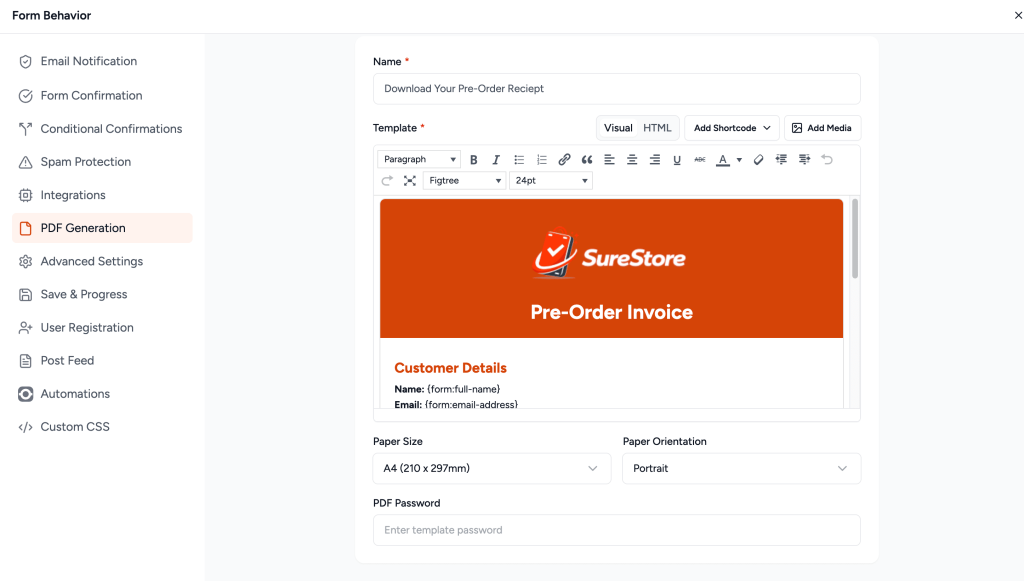
Your invoice or receipt will automatically populate with the submitted data every time the form is completed.
Step 3: Automate Delivery
Set up an automated email to send the PDF directly to your client and a copy to yourself the moment the form is submitted.
You can even set up an invoice or receipt download button with form confirmation.
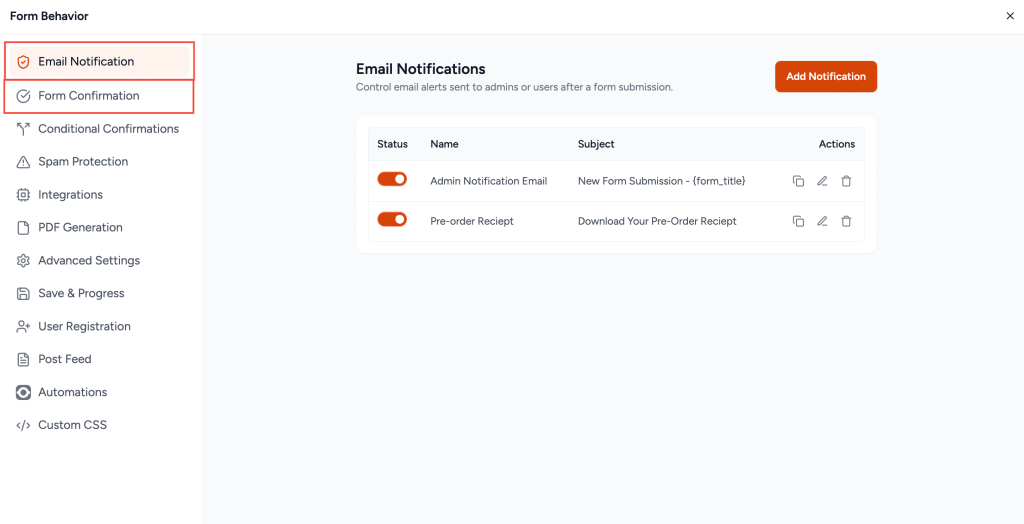
No manual steps, no delays, no forgotten documents.
Step 4: Keep Records Automatically
Every submission is stored in your SureForms dashboard, giving you a clean record of every invoice sent and every receipt issued, all in one place.
Whether you’re managing a handful of clients or scaling toward a full agency operation, this kind of automation saves hours and eliminates the kind of small errors that erode client trust.
A professional, consistent document sent at exactly the right time is a small thing that makes a big impression
Conclusion
Invoices and receipts are not interchangeable. One requests payment, the other confirms it.
Getting them right matters for your cash flow, your bookkeeping, and the impression you leave on clients. With a strong business idea, even these small details can shape how your audience sees your professionalism.
To recap:
- Send an invoice to request payment, before or at the point money is due.
- Send a receipt after payment has been received, every time, without exception.
- Use consistent numbering, clear descriptions and accurate dates on both documents.
If you’re still creating them manually, it’s worth seeing how SureForms can handle the whole process for you.
You build the form once and every client submission generates the right document automatically, delivered to the right person at the right time.
Explore SureForms and see how easy it is to get your invoicing and receipts running on autopilot.
FAQs
Is an invoice the same as a receipt?
– No. An invoice is a request for payment sent before the client pays, while a receipt is issued after payment as proof that the transaction has been completed.
Can you use a receipt as an invoice?
– No. A receipt confirms that payment has already been made, while an invoice requests payment. Since they serve different purposes in accounting and record-keeping, they should not be used interchangeably.
What comes first, an invoice or a receipt?
– The invoice comes first. You send an invoice to request payment from a client. Once the payment is received, you issue a receipt to confirm the transaction.
Does invoice mean paid?
– No. An invoice simply means payment has been requested. It only becomes paid when the client completes the payment, after which you typically issue a receipt as confirmation.
Invoice vs receipt: what’s the main difference?
– The main difference between an invoice and a receipt is timing and purpose. An invoice is sent before payment to request money, while a receipt is sent after payment to confirm that the transaction has been completed.