Long forms are a necessary part of doing business online.
Insurance quotes, job applications, grant submissions, and onboarding flows all need a lot of information.
Getting that information means asking users to spend valuable time filling out forms.
The problem is, life doesn’t pause for a form.
- Someone starts an application on a break and gets pulled into a meeting.
- A customer begins a quote and realizes they don’t have a required document.
- A user on mobile runs out of time before their commute ends.
Without a way to save progress, all of that effort disappears, and usually, so does the user.
That’s exactly why save and continue matters for forms.
It’s a small feature with a surprisingly large impact on how many people actually finish what they started.
- What Does "Save and Continue" Mean for Forms?
- Who Actually Needs This Feature?
- What Happens Without It?
- The Real Cost of Form Abandonment
- What Makes a Good Save and Continue Experience?
- Security and Data Sensitivity
- Benefits of Allowing Users to Save and Continue Long Forms
- How To Add Save and Continue With SureForms
- Conclusion
What Does “Save and Continue” Mean for Forms?
Save and continue is a feature that lets users pause a partially completed form and return to it later without losing their progress.
Instead of starting from scratch every time, they pick up exactly where they left off.
It sounds straightforward, but the implementation matters.
A well-built save and continue feature stores responses securely, sends the user a way to return (usually via email link or account login), and restores everything cleanly when they come back.
When it works well, it removes one of the biggest barriers to form completion, namely the pressure to finish everything in one sitting.
Who Actually Needs This Feature?
Not every form needs to save and continue. A two-field contact form? You don’t need it.
But once a form crosses a certain length or complexity threshold, the case gets very strong very quickly.
The form types that benefit most include:
- Multi-step job or grant applications where applicants need to provide supporting documents, reference details or employer information.
- Insurance or financial quote forms that require policy numbers, vehicle details, or income figures the user may not have on hand.
- Healthcare and patient intake forms where personal history, medication lists and insurance details take time to compile accurately.
- Onboarding flows that ask for business information, tax details or team member data across multiple screens.
- Surveys with conditional logic where the path through the form depends on earlier answers and restarting means losing context.
- Checkout or order forms with customization options, delivery preferences or account setup steps.
If your users are being asked to do research, gather documents, or consult someone else before completing a form, save and continue isn’t just nice-to-have, it’s the difference between a form that gets finished and one that gets abandoned.
What Happens Without It?
Picture this:
A user finds your form, starts filling it out and gets a third of the way through before they realize they need a document they don’t have with them.
They think they’ll come back to it and close the tab.
Later, they try to find the form again, navigate back to it and discover the fields are blank. Everything they entered is gone.
At that point, most users don’t start over. They give up, contact support, or move on.
The ones who do restart are now doing the same work twice and they know it.
That frustration shapes how they feel about your business before the form is even submitted.
Support tickets follow. “I already filled this out” is one of the most common complaints around complex forms and it’s entirely avoidable.
The irony is that the longer and more detailed your form, the more valuable each completed submission is, and the more likely users are to abandon without save and continue.
The forms where you most need completion are the exact forms most vulnerable to drop-off.
The Real Cost of Form Abandonment
Form abandonment is a bigger problem than most businesses realize and scales directly with form length.
Our own experience consistently shows that completion rates drop sharply as the number of fields increases.
Forms with more than five fields see measurably higher abandonment, and complex multi-step forms can lose the majority of users before the final submission.
For context, the average cart abandonment rate in ecommerce sits around 70%.
Form abandonment for lengthy or complex forms often runs higher, because at least a shopping cart saves its contents automatically.
Most other forms don’t extend the same courtesy.
Every abandoned form is a lost lead, a missing application, or an incomplete customer record.
At scale, that adds up fast.
Save and continue doesn’t fix every reason someone might leave a form unfinished, but it eliminates one of the most common and most preventable ones.
What Makes a Good Save and Continue Experience?
The feature is only as useful as the experience around it.
A technically functional save and continue that confuses users or loses their data in practice isn’t much better than not having it at all.
Here’s what a well-implemented version looks like:
- Clear messaging throughout: Users should know the option exists before they need it, not just when they’re about to leave. A visible “save and continue later” button or progress indicator builds confidence that their work is safe.
- A reliable return path: Email links are the most common method and work well when implemented properly. The link should be unique, take users directly back to their saved form and not require them to remember a password or create an account just to resume.
- Defined storage duration: Users need to know how long their progress will be saved. “Your form will be saved for 30 days” is reassuring. No information at all creates anxiety. If the saved session expires, users should get a warning before it disappears.
- A clean restoration experience: When a user returns, every field should be exactly as they left it. Conditional logic should reflect their earlier answers. Nothing should reset unexpectedly.
- No friction to save: If saving progress requires creating an account or completing a CAPTCHA, some users won’t bother. The simpler the save action, the more likely users are to use it.
Getting these details right is what separates a feature that actually improves completion rates from one that just looks good in a feature list.
Security and Data Sensitivity
For longer forms, users are often sharing personal, financial, or health-related information.
That raises a reasonable question about where that data is going and how safe it is while it’s being stored.
A responsible save and continue implementation approaches this very carefully.
Saved form data should be fully encrypted. It should not be stored in browser cookies or plain session variables where it can be easily read or intercepted.
Return links should expire after a reasonable period and ideally be single-use, so an old link in someone’s inbox can’t be used to access their data indefinitely.
For WordPress users, this is one of the practical advantages of using a native tool like SureForms.
Your form data stays within your own hosting environment rather than being processed through a third-party server.
That matters for compliance, for user trust and for the kind of data protection expectations users increasingly bring to any online interaction.
If your forms collect anything sensitive, it’s worth understanding exactly how your save and continue solution handles storage before you turn it on.
It’s also worth communicating that clearly to users to reassure them that their data is safe.
Benefits of Allowing Users to Save and Continue Long Forms
You should have a pretty good idea of the benefits of save and continue by now, but just in case…
Higher Completion Rates
This is the most direct benefit. When users know they can save their progress, they’re more likely to start and much more likely to finish.
The fear of losing work is a real deterrent, especially for longer forms. Removing that fear removes a reason not to complete.
A Better User Experience
Forcing someone to finish a form in one session treats their time as less valuable than your data collection needs.
Save and continue flips that dynamic.
It tells users that you respect how they work and that your process bends around their life rather than the other way around.
That kind of consideration builds trust.
More Accurate Responses
When users feel rushed, they guess, skip, or enter placeholder answers just to move forward.
Give them the ability to pause and come back with the right information and you get better data.
Reduced Abandonment on Mobile
Mobile users are already dealing with smaller screens, slower input and more interruptions.
They’re also the least likely to return to a form they abandoned, because finding it again takes effort.
Save and continue with an email link gives them a clean path back, which meaningfully reduces mobile drop-off.
Fewer Support Requests
When users lose progress, they contact support. They’re frustrated and you have to handle that as well as verify what they already submitted and everyone wastes time.
Save and continue doesn’t just help users, it also reduces the operational cost of running complex forms.
How To Add Save and Continue With SureForms
SureForms includes save and continue functionality as part of its form-building toolkit, so you don’t need a separate plugin or a custom development solution to make it work.
Setup is handled from within form settings.
Once enabled, users will see an option to save their progress at any point during the form.
SureForms handles the storage and sends users a way to return to their form when they’re ready to finish.
Because SureForms is built for WordPress, the feature fits naturally into your existing website with no compatibility headaches.
Your form data also stays within your own environment, which matters for anything involving sensitive user information.
Here’s how you can add save & continue feature in your forms created with SureForms:
To enable Save & Progress in SureForms, start by heading over to your SureForms Form Editor and clicking on Form Settings from the dropdown on the top-right.
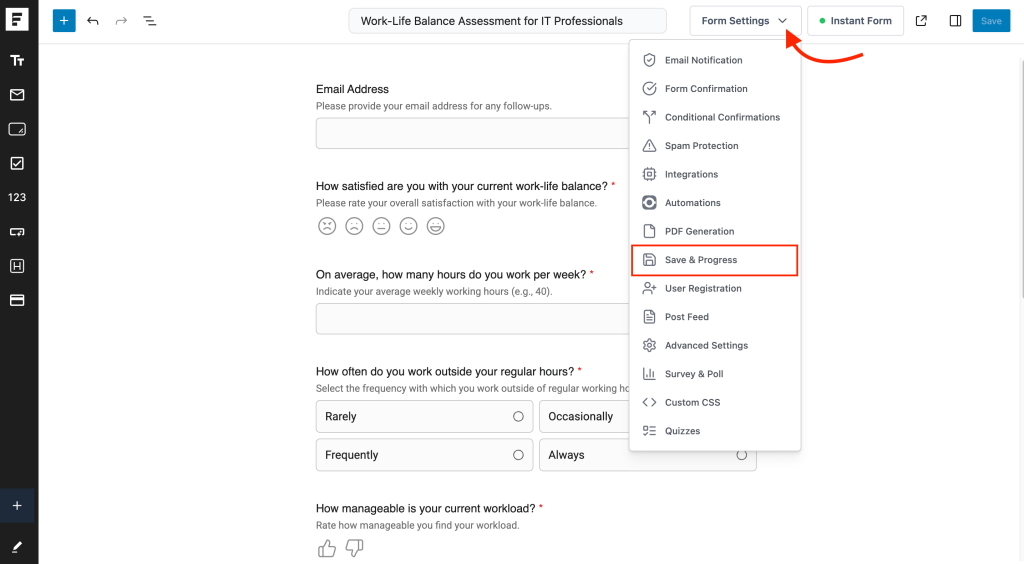
From there, click on the Save & Progress tab. Once you’re in, simply turn on the toggle to enable the feature.
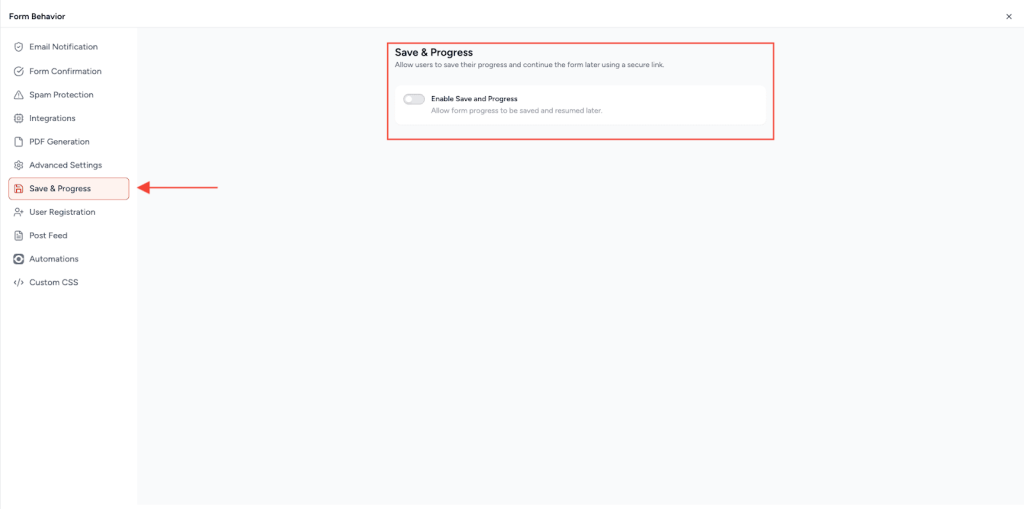
As soon as you enable it, you’ll see a few additional options appear, like customizing the Resume Link label and the confirmation message your users will see.
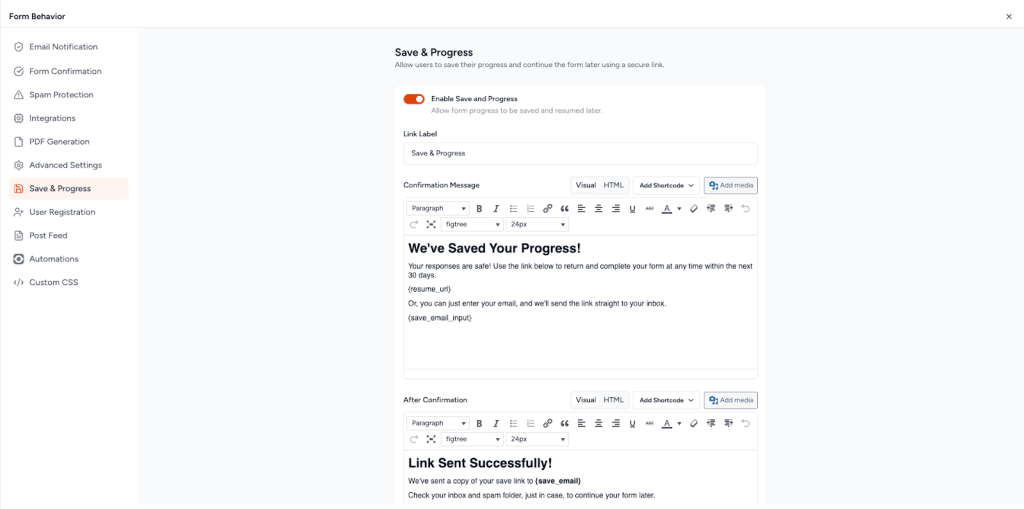
Make your changes, close the form settings window & save the form, and you’re all set. It’s really that easy!
If you want a more detailed explanation, check out our documentation on the Save & Progress feature in SureForms
👉 You can try the Save & Progress Feature in SureForms on a demo site with no setup required.
If you’re already using SureForms to build your forms, adding save and continue is a simple configuration change rather than a project.
If you’re not using it yet, it’s a strong reason to take a closer look.
Conclusion
Long forms aren’t going away. But the expectation that users will complete them in one uninterrupted session is out of step with how people actually work, browse, and live.
Save and continue is one of those features that feels minor until you see what happens to completion rates without it.
It reduces abandonment, improves data quality, respects user time, and costs you nothing in terms of complexity, especially when SureForms handles the hard part for you.
If your forms are longer than a few fields, it’s well worth using.
If you’re not using SureForms yet, now is a good time to try.