The question we hear most from agencies and freelancers isn’t “how do I build a form.”
It’s “how do I make every form look the same without touching each one individually.”
And for anyone migrating to SureForms from older setups: “do I really have to rebuild all my old forms from scratch?”
SureForms 2.10 answers both.
This release ships the feature we’ve been building toward since the design system conversations started. Global Style Presets along with a one-click HTML form importer that turns your existing HTML forms into native SureForms blocks without rebuilding them field by field.
Here’s everything that’s new, what it does, and why it matters.
Global Style Presets: your brand, applied to every form at once
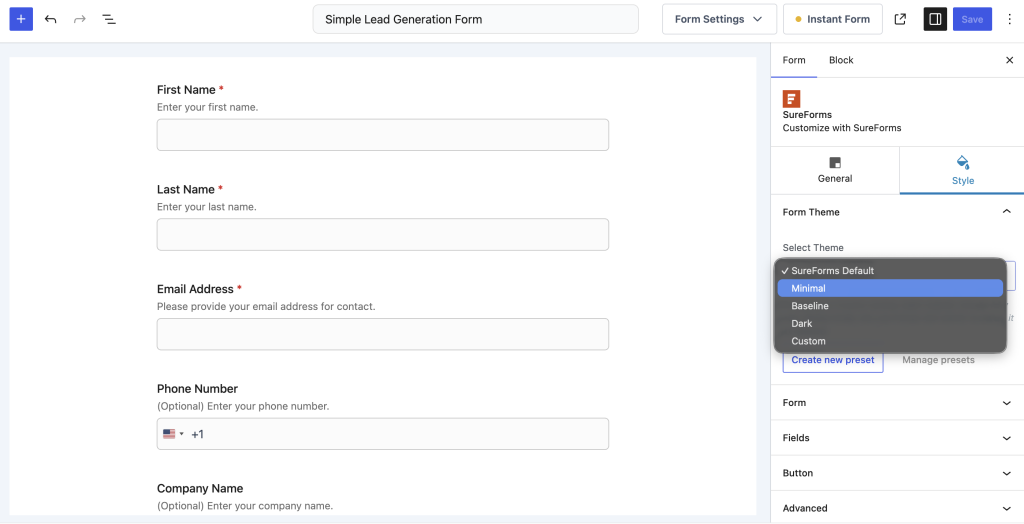
If you’ve ever updated your site’s colour scheme and then spent an afternoon going through every form to match it, you already understand the problem Style Presets solve.
Three built-in themes to start
The Form Style – Theme picker now ships with three ready-to-use presets:
- Minimal,
- Thin,
- Dark.
Each one is a carefully considered design, not just a colour swap, but a complete form aesthetic. Pick one and your form looks polished before you’ve made a single customisation.
Create and save your own presets
The real power is in custom presets. Style a form exactly the way you want, colours, border radius, typography, spacing, then save that styling as a named preset. Give it your brand name, your client’s name, whatever makes sense. From that point on, any new form can inherit that preset in one click.
Update once, reflect everywhere
This is the part that changes how you work at scale. When you update a saved preset, every form using that preset updates automatically. No going form by form. No missed forms on a buried landing page. One change, site-wide.
It works on both standalone instant forms and embedded form blocks, so the experience is consistent however your forms are deployed.
If you manage multiple client sites or run an agency, this alone is worth the update.
The HTML Form Importer: migrate in one click, not one afternoon
A lot of WordPress sites have old contact forms sitting in page templates, theme files, or static HTML, forms that were hand-coded years ago and have been quietly collecting dust since.
Until now, moving those into SureForms meant rebuilding them from scratch: field by field, label by label, validation rule by validation rule.
Not anymore.
Paste your HTML. Click convert. Done.
The new one-click HTML form importer takes any raw HTML form and converts it into a fully native SureForms form, block-based, editable, and submission-ready. Fields, labels, structure, all mapped across automatically.
The converted form is immediately available in the SureForms editor. Add conditional logic, hook in an integration, apply a style preset, and publish. What used to take an afternoon now takes just a few minutes.
This is particularly useful if you’re:
- Migrating a client site to SureForms from their old sites
- Bringing in legacy forms from a static HTML theme
- Moving forms built in another tool that exported HTML
What else is in 2.10
Live character counters on Textarea Textarea fields now show users a real-time count as they type. Combined with min/max character limits, you get full control over response quality, and users stop guessing whether they’ve written enough.
Dynamic Default Values on multi-select fields Multi-select Dropdowns and Multi-Choice checkbox fields can now be pre-populated dynamically from URL parameters, user meta, or custom logic. This was already available on single-select and text fields, now it’s consistent across the whole field set.
Create or Update Pipeline Record in Bigin The Bigin by Zoho native integration gains a new action: directly create or update a pipeline record from a form submission. Quote forms, booking forms, and lead capture forms can now push directly into your sales pipeline, not just your contacts list.
The fixes worth knowing about
A few things that were quietly causing frustration are now gone:
- CSV exports now keep line breaks from Textarea fields. Fixed the Multi-line answers that were collapsing on export.
- Entry URL now records the page the form was submitted on, not just the form’s permalink, critical if the same form lives on multiple or dynamic pages.
- Accessibility fix for Dropdown and Address fields. Help text has been moved outside <legend> so screen readers handle it correctly.
- OttoKit Google Drive uploads now deliver on every submission, not just the first one in a session. A silent bug was dropping attachments after the first submission. Gone.
If you’re on a Premium plan, update from your WordPress dashboard, the new style presets and preset manager will be waiting in the Form Style panel on any form. The HTML importer is available to all users free.
Style presets are available on the Premium plans. If you’re on the Free plan and the preset and features are on your radar, now’s a good time to take a look at what’s included.
What’s coming next?
Multi Language Support – WPML – After so many requests, we have started making our form plugin compatible with WPML and soon it will be live in coming releases
Form Migration – Still having some forms in different plugins? This feature will help you migrate all of your forms in just one click.
Third party upload – Most essential feature which we have planned and started working on it. In coming release, you’ll be able to map all your upload field files directly into your Google Drive, Dropbox, and in OneDrive.
That’s all for now.
See you in the other releases