There are two types of WordPress users who have been waiting for this release.
The first group has Contact Form 7, WPForms, Gravity Forms, or Ninja Forms installed right now. They have built dozens of forms over the years. The idea of switching to SureForms has crossed their mind more than once. But every time they seriously think about it, the same thought stops them: “I’d have to rebuild everything from scratch.”
The second group runs multilingual WordPress sites. They use WPML. Their forms need to work in multiple languages. And every time they searched for a form plugin that actually supports WPML properly, they came up empty.
The new update of SureForms ( 2.11.0 ) solves both problems directly.
This release also ships few new integration which can make acces to your cloud storage and let you upload to Dropbox, Google Drive, and Amazon S3 for Pro users,
With that, a new Color Picker field, rich text formatting for Post Content in CPT feeds, and a set of fixes that have been quietly causing headaches for weeks.
Here is everything that is new, what it does, and why it matters for your site.
Table of Contents
- The Form Migrator: Switch to SureForms Without Rebuilding a Single Form
- Native WPML Support: Translate Every Form Individually
- Cloud Storage Uploads: Send Files Directly to Dropbox, Google Drive, or Amazon S3
- New Color Picker Field
- Rich Text Editor for Post Content in CPT Feeds
- MCP Ability Updates: Additional CSS Class Support for Fields
- Fixes Worth Knowing About
Switch to SureForms Without Rebuilding a Single Form
Contact Form 7 has over 10 million active installs. WPForms powers more than 6 million sites. Gravity Forms is the go-to for developers and agencies building complex form workflows. Ninja Forms has nearly 1 million installations.
Together, those four plugins are sitting on a significant portion of the WordPress ecosystem.
And at WordCamp Asia 2026, Contact Form 7’s creator Takayuki Miyoshi officially confirmed that CF7 will not receive any new features beyond version 6.2. That is not a rumor. That is a feature freeze from the plugin’s own creator. If you are running Contact Form 7 today, you are running a plugin in maintenance mode with no roadmap.
The only thing stopping most people from moving is the rebuilding problem. Who has time to recreate every form field, every label, every validation rule, every notification email, one by one?
Starting with SureForms 2.11, you do not have to.
- Migrate Contact Form 7 Forms to SureForms
- Migrate Ninja Forms to SureForms
- Migrate WPForms to SureForms
- Migrate Gravity Forms to SureForms
How the Form Migrator works
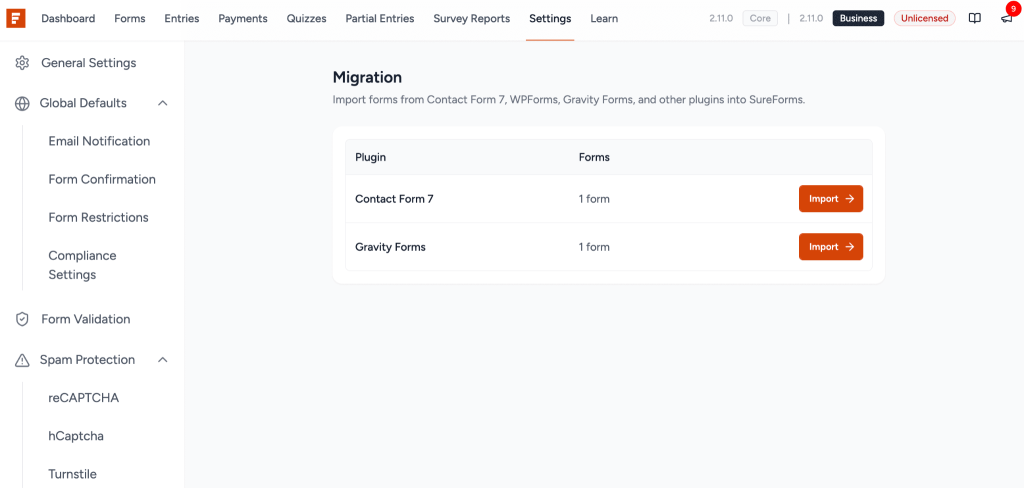
The Form Migrator detects whichever of the four supported plugins you have installed and lists all of your existing forms. You pick the ones you want to bring across, click import, and SureForms converts them into fully native SureForms blocks.
Fields come across. Labels come across. Structure comes across. The imported form opens in the SureForms editor, ready for you to add conditional logic, connect an integration, apply a style preset, and publish.
What used to be an afternoon of copy-paste work now takes a few minutes.
Why this matters right now
The Contact Form 7 feature freeze is the clearest signal the WordPress community has seen in years that a major plugin has reached its ceiling. Every week that passes is a week where CF7 users are one WordPress update away from a compatibility problem with no fix coming.
If you have been sitting on the fence about switching, this is the practical moment to move. The migrator removes the one real reason not to.
Native WPML Support: Translate Every Form Individually
WPML is used on over 1.5 million WordPress sites. It is the most widely deployed multilingual plugin in the WordPress ecosystem, and it has been the standard solution for agencies and businesses running sites in multiple languages since 2008.
Until now, using SureForms on a WPML-powered site meant translation was a workaround, not a feature. Form content was either duplicated manually or excluded from the translation workflow entirely.
SureForms 2.11 adds full native WPML support using String Packages.
What this means in practice
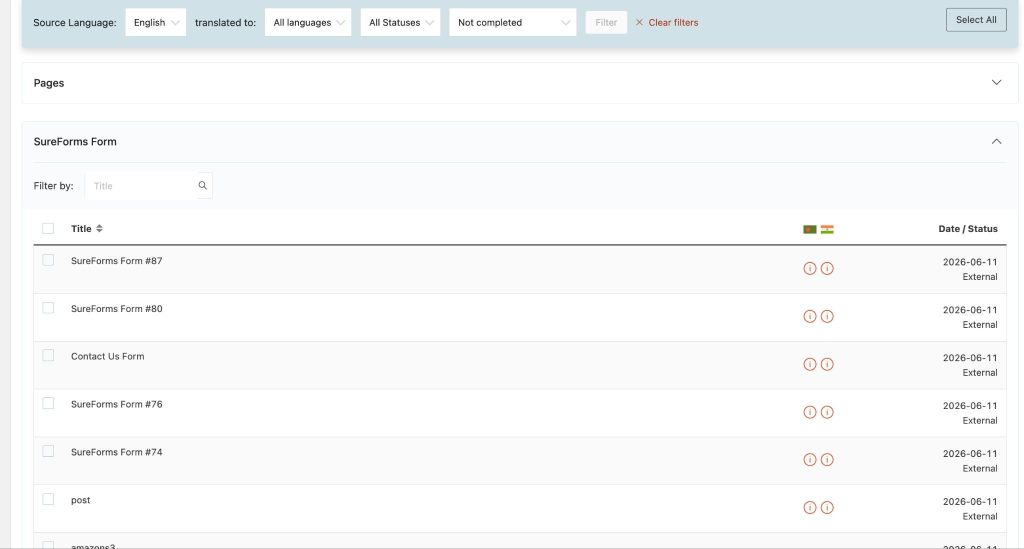
Every form you build in SureForms can now be translated individually through WPML’s standard translation interface. Field labels, placeholder text, help text, validation messages, confirmation messages, and button labels all register as translatable strings via String Packages.
You translate each form in the WPML translation editor the same way you translate any other content on your site. No workarounds, no custom code, no copying forms into duplicate pages for each language.
If you run an English and French version of your site and you have a contact form, a quote request form, and a registration form, all three are now translatable through the same WPML workflow you already use for your pages and posts.
Who this is for
Any WordPress site running WPML benefits from this immediately after updating.
Agencies managing multilingual client sites can now build forms once and translate them through WPML rather than maintaining separate form sets for each language. That alone cuts the maintenance burden significantly for anyone managing more than two or three languages.
International businesses, education platforms, government and non-profit sites, and ecommerce stores serving customers in multiple languages all have the same need: forms that respect the language of the page they appear on.
SureForms 2.11 handles that natively. No third-party bridges, no compatibility plugins, no workarounds.
Send Files Directly to Dropbox, Google Drive, or Amazon S3
Every form that collects file uploads has a storage problem waiting to happen.
Hosting files on your WordPress server works fine when you have ten submissions. It starts causing problems when you have a thousand. Disk space fills up. Backups get heavy. Files are accessible through predictable URLs. Sharing specific files with team members means downloading and re-uploading them to wherever your team actually works.
The new update of SureForms solves all of that in one setting.
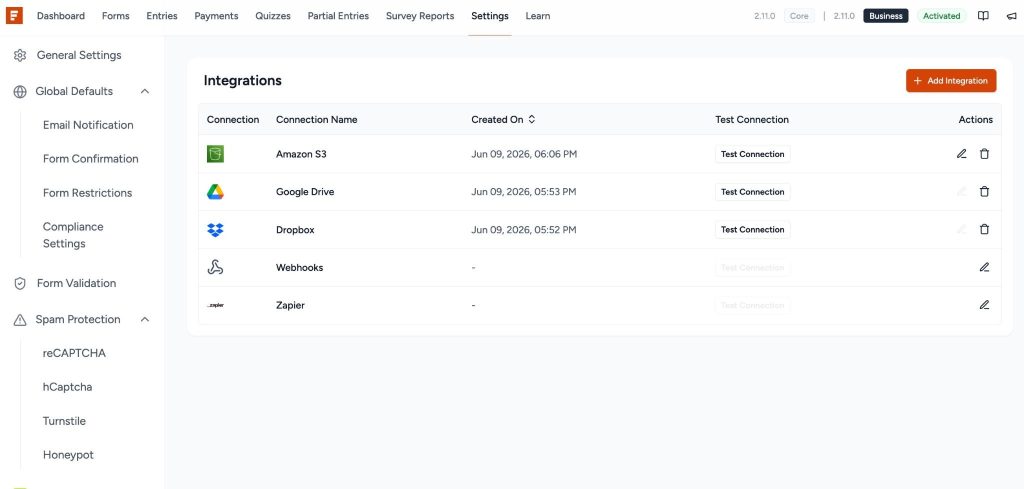
Pro users can now route file submissions directly to Dropbox, Google Drive, or Amazon S3 instead of storing them on the server. Configure your cloud storage destination once per form, and every file upload from that form goes directly where it needs to go.
What this looks like in real use
A law firm’s new client intake form collects signed documents, ID scans, and supporting files. Those files go straight into a designated Google Drive folder, organized and accessible by the team instantly after submission. No downloading from the WordPress dashboard, no manual re-uploading.
An agency’s project brief form collects reference files, brand assets, and creative documents from new clients. Those go directly into a Dropbox folder for the project team.
An HR team’s job application form collects CVs, portfolios, and cover letters. Those routes to Amazon S3 where they are stored, indexed, and accessible through the team’s existing S3 workflow.
In each case, the submitter experiences a normal form submission. Behind the scenes, the file has already landed where it needs to be.
Why competitors handle this differently
Ninja Forms treats cloud storage as a paid add-on purchased separately on top of a membership. Fluent Forms has a third-party plugin for it that handles some providers but not all. Gravity Forms require separate add-ons for each storage provider.
SureForms Pro includes Dropbox, Google Drive, and Amazon S3 in a single unified upload workflow with no additional purchase required. You pick the provider, configure the connection, and it works.
This is the kind of feature that makes SureForms the right choice for agencies and businesses that need professional-grade form workflows, not a basic contact form with bolt-ons.
New Color Picker Field
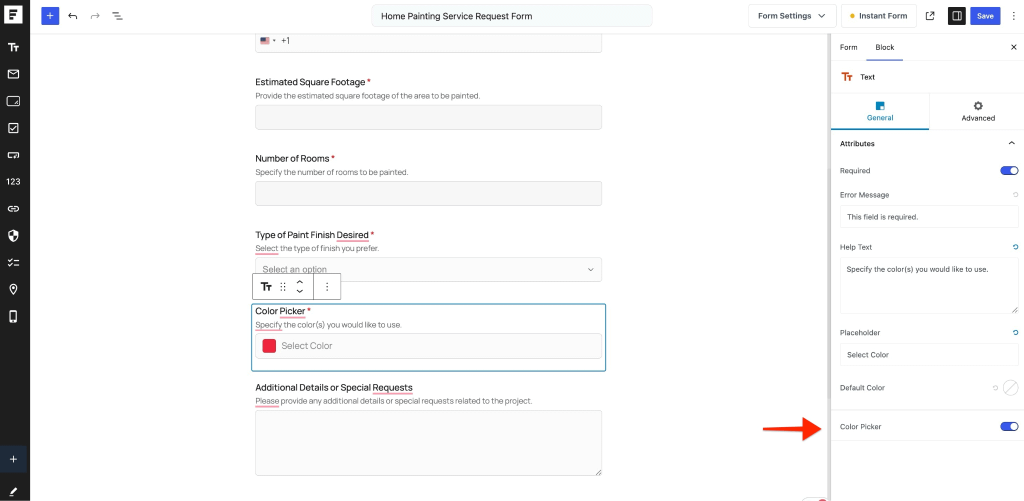
The Color Picker field is exactly what it sounds like and more useful than it might first appear.
You can now add a native color picker input to any form. Users open the picker, select a colour, and the hex value or RGB value is captured in the submission.
The use cases are real and specific. Custom merchandise order forms where buyers specify brand colours. Website design brief forms where clients indicate colour preferences for their project. Interior design consultation forms. Product customization forms for anything from printed materials to furniture finishes.
Previously, handling colour selection in a form meant either a text field with instructions to “enter a hex code” (which most users would not know how to do) or a dropdown with a limited list of colour names (which is imprecise and often frustrating).
The Color Picker field replaces both of those with an actual visual colour selector. Users pick what they mean. You receive an exact value. No interpretation required.
Rich Text Editor for Post Content in CPT Feeds
If you use SureForms to collect form submissions and publish them as WordPress posts through CPT feeds, this one matters a lot.
Until now, the Post Content field in CPT feeds accepted plain text only. If a user wrote a multi-paragraph response with formatting in mind, it was stored and published as an unformatted text block. You would have to go into the post editor afterward and add the formatting manually.
SureForms 2.11 replaces the plain text input with a full TinyMCE rich text editor for the Post Content field.
Users can now format their submission content with headings, bold and italic text, bullet lists, numbered lists, and links directly inside the form. That formatted content is stored and published into the WordPress post exactly as written.
For any site using SureForms to power community-generated content, job boards, real estate listings, event submissions, or any workflow where users create content that becomes published posts, this removes an entire manual editing step from the process.
MCP Ability Updates: Additional CSS Class Support for Fields
SureForms added MCP support in 2.6.0, making it one of the first WordPress form plugins to allow AI coding assistants and autonomous agents to build and manage forms programmatically.
In 2.11, the create-form and update-form MCP abilities gained support for Additional CSS Class on individual fields.
If you are building forms through AI tools or agent workflows, you can now specify custom CSS classes per field as part of the MCP instruction. This means AI-assisted form builds can produce forms with the correct class assignments for custom styling or JavaScript targeting, without any manual cleanup in the editor afterward.
For development teams using AI-assisted workflows, this closes a gap that requires editor intervention after every AI-generated form.
Fixes Worth Knowing About
This was the most impactful bug in this release. In certain situations, when a form re-rendered (after validation, after a page break, or on certain dynamic updates), conditional logic rules were silently discarded. The fields would show or hide incorrectly, and the rules would not be there when you reopened the conditional logic panel to check.
This is now fixed. Configured conditional logic rules are preserved reliably through all re-render scenarios.
If you had forms where conditional logic was behaving unexpectedly, update to 2.11.0 and check those forms.
CPT feed taxonomy mapping creating duplicate terms in SureDash
When a CPT feed mapped a taxonomy field using term names rather than slugs, the same term could be created multiple times with slight variations in formatting. Taxonomy data in SureDash would accumulate duplicates over time.
This is now fixed. Taxonomy mapping resolves terms by slug, which means each term is matched to the existing record rather than creating a new one.
Survey and poll smart tags emitting unstructured payloads in integrations
When survey or poll responses were sent to native integrations, the smart tag payload was not structured correctly. Data would arrive in integration destinations as a raw string rather than a mapped object, which meant fields were not mapping to the correct columns or properties.
This is now fixed. Survey and poll smart tags emit a properly structured payload, so your integration mappings work as expected.
Also in This Release
A few more things worth knowing before you update.
Additional CSS Class support for fields in MCP abilities: The create-form and update-form MCP abilities now support Additional CSS Class on individual fields. If you build or manage forms through AI agent workflows, custom CSS classes can now be specified per field as part of the MCP instruction. No manual cleanup in the editor afterward.
Form Migrator Pro blocks handle complex form structures:The free migrator handles all core field types cleanly across all four supported plugins. The Pro migrator goes further and handles multi-page forms, advanced field configurations, and Pro-tier fields from WPForms Pro, Gravity Forms, and Ninja Forms Pro. If your most important forms are complex, Pro migration brings them across correctly.
Conditional logic conditions no longer dropped on re-render: In certain scenarios, conditional logic rules were being silently discarded when a form re-rendered. If you had forms where rules were disappearing or behaving unexpectedly, this fix resolves it. Worth checking any form where conditional logic felt unreliable before this update.
CPT taxonomy mapping now resolves terms by slug: Taxonomy fields in CPT feeds were creating duplicate terms over time instead of matching existing ones. Fixed. Terms now resolve by slug, so your SureDash taxonomy data stays clean going forward.
Survey and poll smart tags now emit structured payloads in integrations: Survey and poll data arriving in integration destinations as raw strings rather than mapped objects is now fixed. Field mapping in your integrations works correctly for survey and poll submissions.
Go to your WordPress dashboard and update to 2.11.0 now. Everything above is live.
If you are on the free plan and the Pro features in this release are on your radar, this is a good time to take a look at what is included.