
- Creating and Publishing a Form
- Conversational Form
- Create Multi Step Forms In WordPress
- Using Calculations in SureForms: A Step-by-Step Guide
- Calculation Formula Guide
- SureForms Login Block – Step-by-Step Guide
- SureForms Registration Block – Step-by-Step Guide
- SureForms – PDF Generation Feature
- GDPR Compliant Forms
- Create WordPress Forms With Conditional Logic
- Adjust Form Notification Emails
- Form Confirmation
- Entries Management Feature Guide
- How to Add Query Parameters to Form Redirects
- How to Fetch Query Parameters from URL
- Set the “From Email” in SureForms
- Setting Up “Reply-To” Email Using Form Input Tags – SureForms
- Restrict Form Entries in SureForms
- Form Scheduling in SureForms
- Conditional Confirmations in SureForms
- How to Connect Your Stripe Account with SureForms
- How to Connect PayPal in SureForms
- How to Create a Payment Form in SureForms
- SureForms Payments
- How Refunds Work in SureForms Payments
- Understanding Payment Processing Fees
- How to Display the Payment Dashboard on the Frontend (SureForms)
- Enable One-Time Payment and Subscription in a Single Form
- SureForms Integration with ActiveCampaign
- SureForms Integration with AgileCRM
- SureForms Integration with Airtable
- SureForms Integration with LatePoint
- SureForms Integration with FluentCRM
- Connect SureForms To Zapier
- WordPress Forms with the Custom App Builder
- SureForms Integration with Telegram
- SureForms Integration with Breeze
- SureForms Integration with Brevo
- Unable to Upload SureForms ZIP: File Unzipped On Download
- Browser Support for SureForms
- Not Getting Update Notifications
- How To Rollback to Previous SureForms Versions
- Publishing Failed: Invalid JSON Response
- Troubleshooting Email Sending In SureForms
- SureForm Submissions Marked as Spam – How to Fix
- API Request Failed – Nonce Verification Error
- Fixing the “Destination folder already exists” Error When Installing SureForms
- How to Set Up SureForms with Caching Plugins
- srfm_enable_redirect_activation
- sureforms_plugin_action_links
- srfm_quick_sidebar_allowed_blocks
- srfm_integrated_plugins
- srfm_suretriggers_integration_data_filter
- srfm_form_submit_response
- srfm_enable_gutenberg_post_types
- srfm_languages_directory
- srfm_form_template
- srfm_disable_nps_survey
Migrate Ninja Forms to SureForms
The SureForms Migration feature allows you to quickly import existing Ninja Forms into SureForms.
Before You Begin
Ensure that:
- SureForms is installed and activated.
- Ninja Forms is installed and contains forms to migrate.
- You have administrator access.
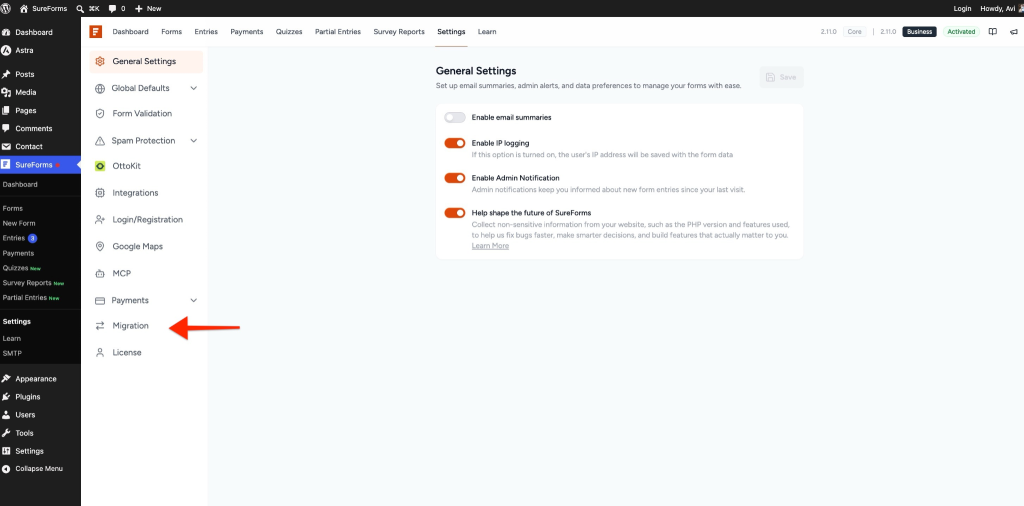
Step 1: Open Migration Settings
- Navigate to SureForms > Settings.
- Click the Migration tab.
Step 2: Select Ninja Forms
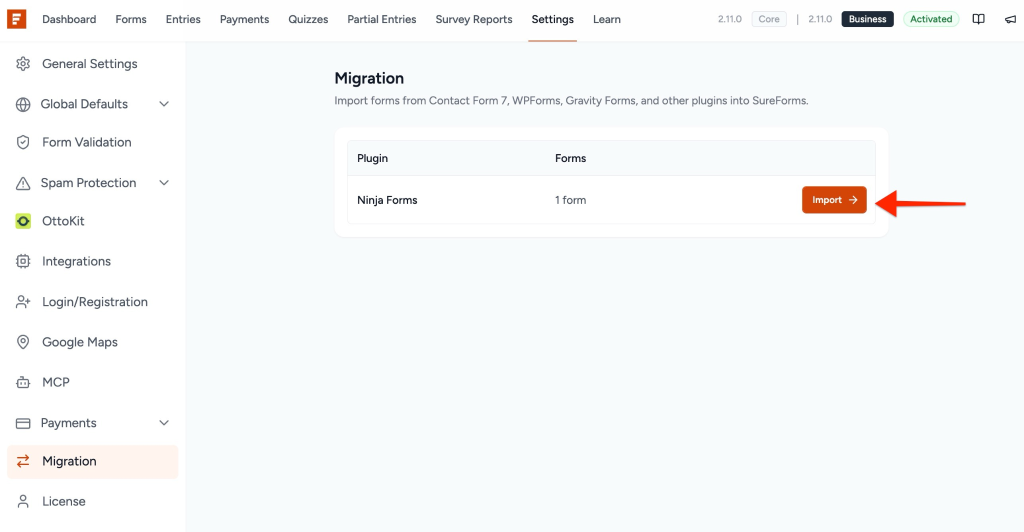
SureForms automatically detects installed form plugins.
Find Ninja Forms and click Import.
The migration screen displays:
- Plugin name
- Number of forms available
Step 3: Select a Form
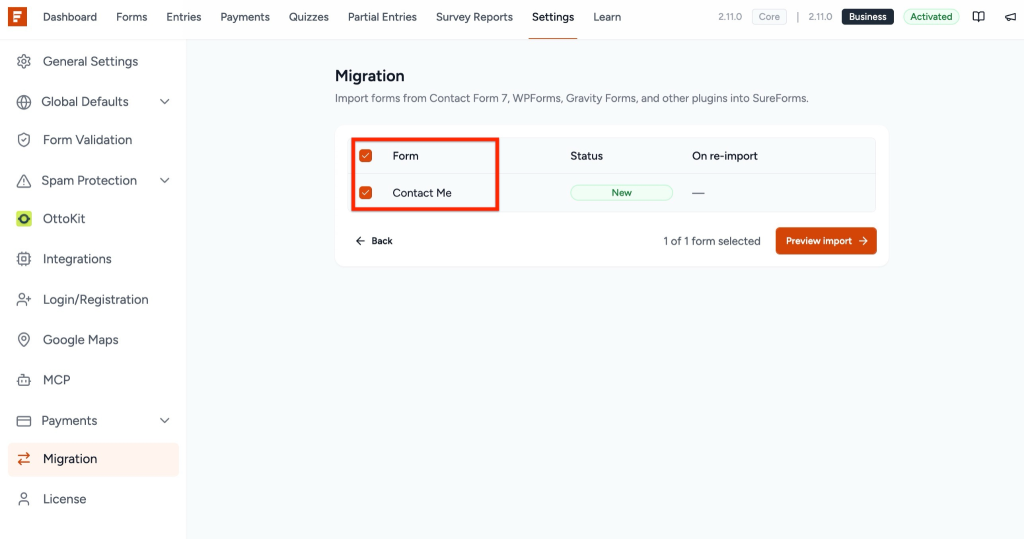
- Choose the Ninja Form you want to import.
- Click Preview Import.
Step 4: Review the Import Preview
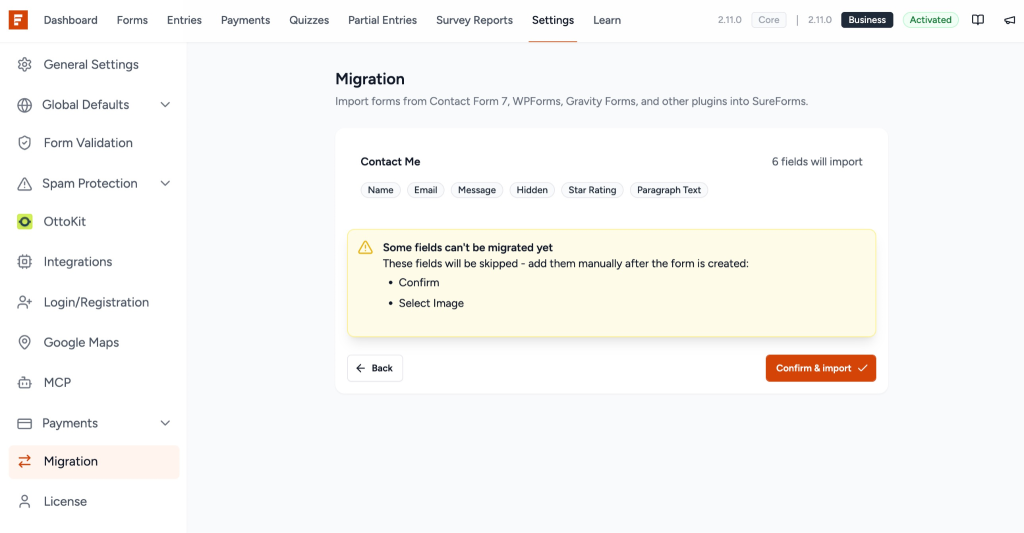
The preview page displays all supported fields that will be imported.
Review the form carefully and click Confirm & Import.
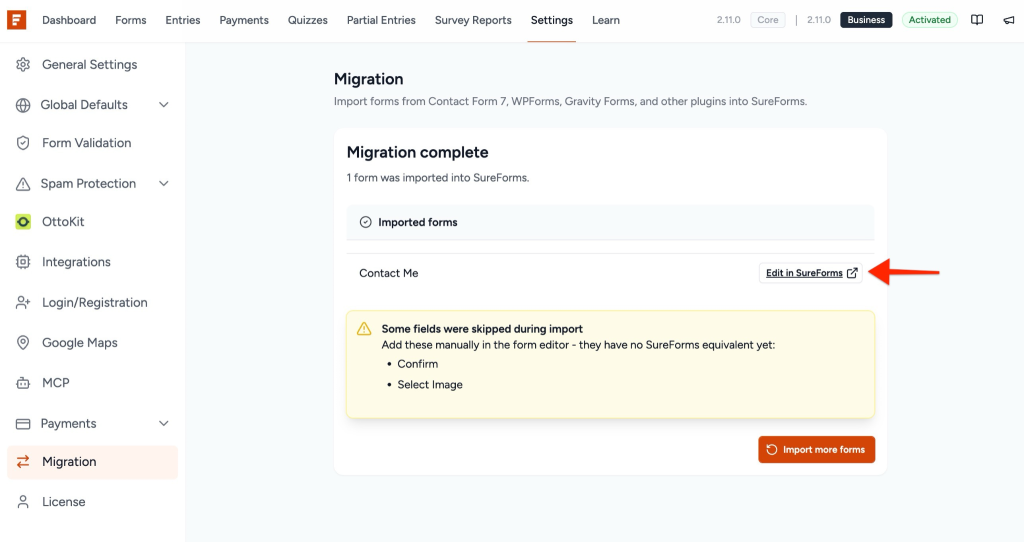
Step 5: Edit the Imported Form
After importing, click Edit in SureForms.
The form will open in the SureForms builder with all supported fields imported.
Review Form Settings
We recommend reviewing:
- Field labels
- Required fields
- Notifications
- Confirmation messages
- Conditional logic
- Integrations
- Custom configurations
Some advanced Ninja Forms settings may require manual configuration after migration.
Verify Smart Tags
Ninja Forms and SureForms use different field tags and merge tags.
Review all:
- Email notifications
- Confirmation messages
- Integrations
- Dynamic content fields
Update any tags that require manual adjustment.
Publish the Form
Imported forms are saved as Drafts by default.
Before publishing:
- Test the form thoroughly
- Verify notifications
- Check integrations
- Review smart tags
After testing, publish the form and embed it on your website.
We don't respond to the article feedback, we use it to improve our support content.