
- Creating and Publishing a Form
- Conversational Form
- Create Multi Step Forms In WordPress
- Using Calculations in SureForms: A Step-by-Step Guide
- Calculation Formula Guide
- SureForms Login Block – Step-by-Step Guide
- SureForms Registration Block – Step-by-Step Guide
- SureForms – PDF Generation Feature
- GDPR Compliant Forms
- Create WordPress Forms With Conditional Logic
- Adjust Form Notification Emails
- Form Confirmation
- Entries Management Feature Guide
- How to Add Query Parameters to Form Redirects
- How to Fetch Query Parameters from URL
- Set the “From Email” in SureForms
- Setting Up “Reply-To” Email Using Form Input Tags – SureForms
- Restrict Form Entries in SureForms
- Form Scheduling in SureForms
- Conditional Confirmations in SureForms
- How to Connect Your Stripe Account with SureForms
- How to Connect PayPal in SureForms
- How to Create a Payment Form in SureForms
- SureForms Payments
- How Refunds Work in SureForms Payments
- Understanding Payment Processing Fees
- How to Display the Payment Dashboard on the Frontend (SureForms)
- Enable One-Time Payment and Subscription in a Single Form
- SureForms Integration with ActiveCampaign
- SureForms Integration with AgileCRM
- SureForms Integration with Airtable
- SureForms Integration with LatePoint
- SureForms Integration with FluentCRM
- Connect SureForms To Zapier
- WordPress Forms with the Custom App Builder
- SureForms Integration with Telegram
- SureForms Integration with Breeze
- SureForms Integration with Brevo
- Unable to Upload SureForms ZIP: File Unzipped On Download
- Browser Support for SureForms
- Not Getting Update Notifications
- How To Rollback to Previous SureForms Versions
- Publishing Failed: Invalid JSON Response
- Troubleshooting Email Sending In SureForms
- SureForm Submissions Marked as Spam – How to Fix
- API Request Failed – Nonce Verification Error
- Fixing the “Destination folder already exists” Error When Installing SureForms
- How to Set Up SureForms with Caching Plugins
- srfm_enable_redirect_activation
- sureforms_plugin_action_links
- srfm_quick_sidebar_allowed_blocks
- srfm_integrated_plugins
- srfm_suretriggers_integration_data_filter
- srfm_form_submit_response
- srfm_enable_gutenberg_post_types
- srfm_languages_directory
- srfm_form_template
- srfm_disable_nps_survey
SureForms Pro – New Form Styling & Preset Features
SureForms Pro now includes powerful new styling options and reusable presets to help you create beautiful, consistent forms across your website with less effort.
This guide walks you through the newly added form styles, how to customize them, and how to create reusable style presets for all your forms.
Overview
With the latest SureForms Pro update, you can now:
- Choose from multiple built-in form styles
- Apply modern styling instantly
- Enable dark mode forms
- Create reusable custom presets
- Update presets globally across forms
- Manage and organize all presets easily
These improvements help you design forms faster while maintaining a consistent brand identity across your website.
Accessing the Form Style Options
To access the new styling features:
- Open your form in SureForms.
- Navigate to the Styles tab.
- Locate the Style Preset dropdown.
Previously, SureForms included:
- Default
- Custom
Now, three additional built-in styles have been added.
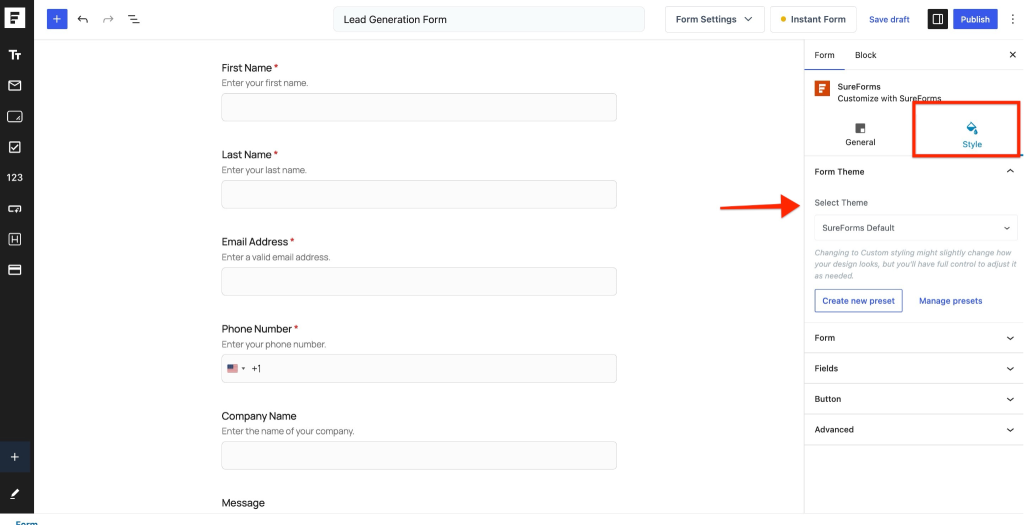
Show the Styles tab with the Style Preset dropdown options.
New Built-in Form Styles
1. Minimal Style
The Minimal preset provides a clean and modern form layout with simplified styling.
Key Highlights
- Minimal and distraction-free design
- Field descriptions displayed below the fields
- Clean spacing for better readability
- Great for professional and modern websites
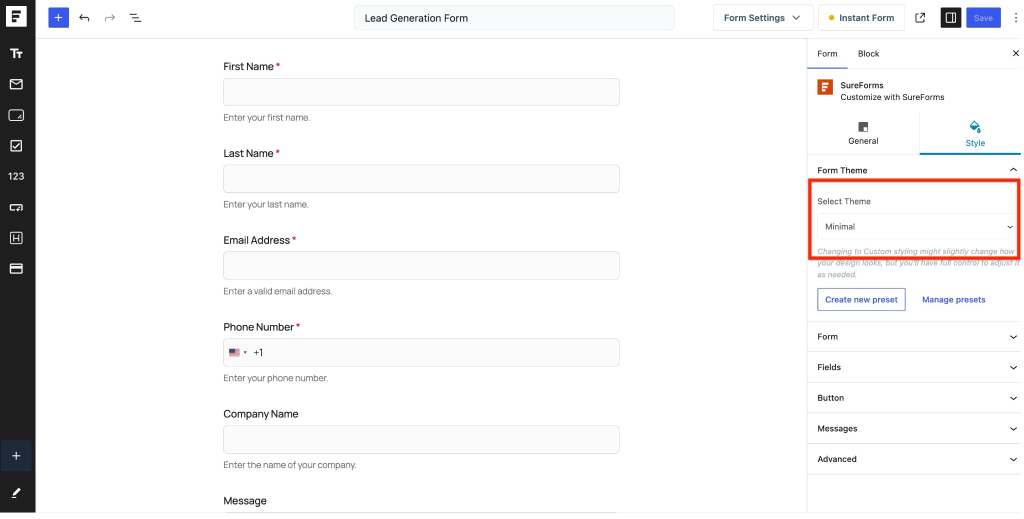
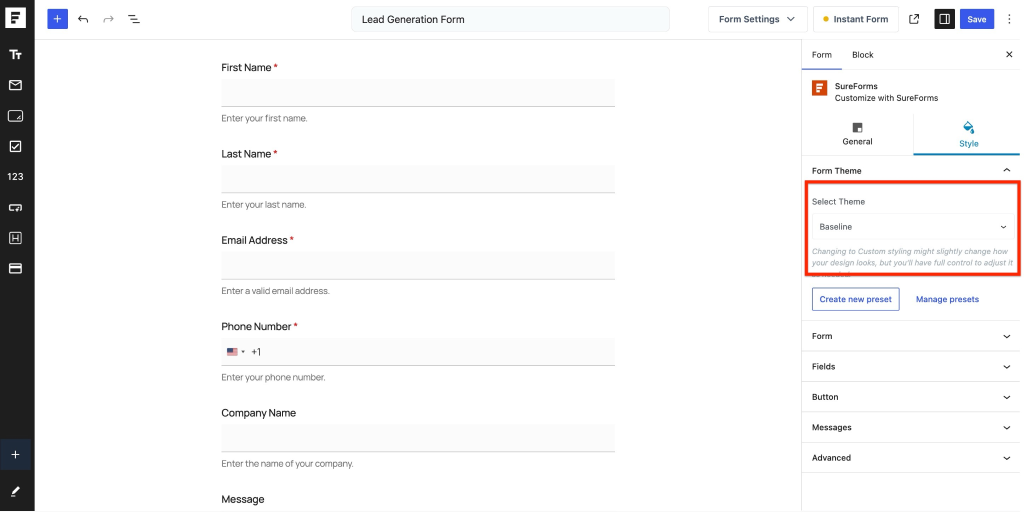
2. Baseline Style
The Baseline preset adds enhanced styling to form fields while keeping the layout simple and professional.
Key Highlights
- Improved field styling
- Better visual separation
- Enhanced form appearance
- Suitable for business and corporate websites
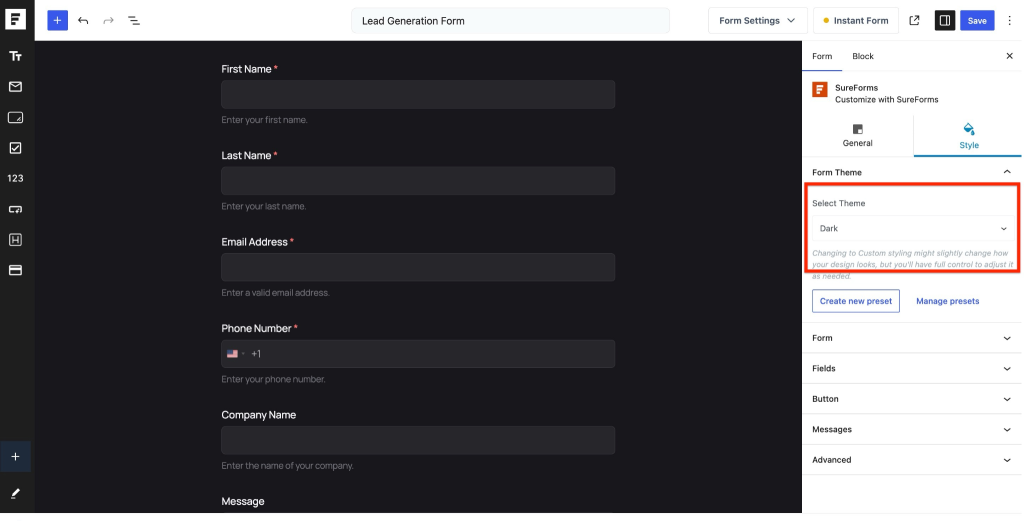
3. Dark Style
The Dark preset enables dark mode styling for your forms.
Key Highlights
- Dark background styling
- Improved contrast
- Modern dark mode appearance
- Perfect for dark-themed websites
Displaying Styled Forms on the Frontend
Once a style is selected, the same design will automatically appear on the frontend of your website.
You can embed the form:
- Inside pages
- In posts
- In footers
- In sidebars
- Anywhere using the SureForms block or shortcode
The selected style will remain consistent wherever the form is displayed.
Create New Preset
One of the most powerful additions is the Create New Preset feature.
This allows you to save your custom form design as a reusable preset.
Instead of styling every form individually, you can create a global design template and reuse it across multiple forms.
How to Create a New Preset
- Open the form styling settings.
- Choose a base style:
- Minimal
- Baseline
- Dark
- Or Custom
- Customize the styling as needed.
- Click Create New Preset.
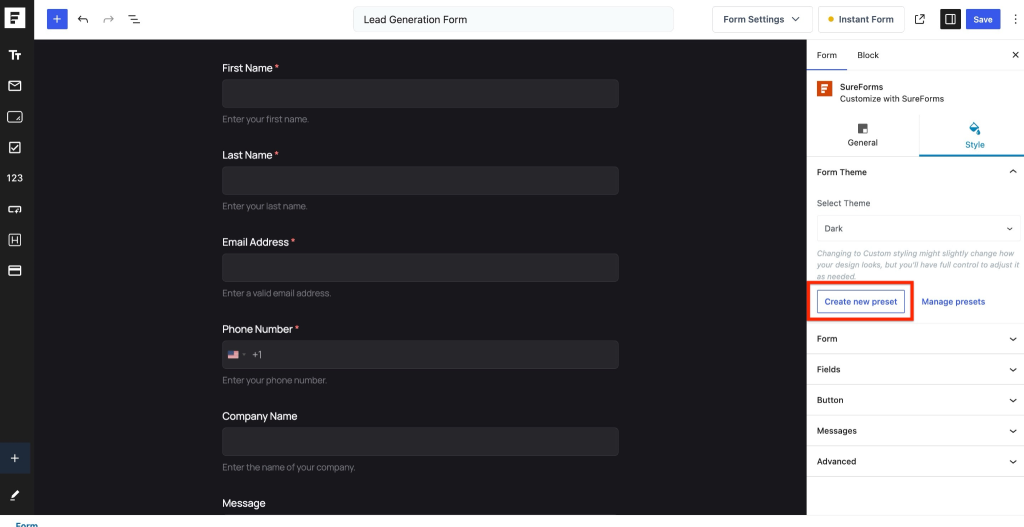
- Enter a preset name.
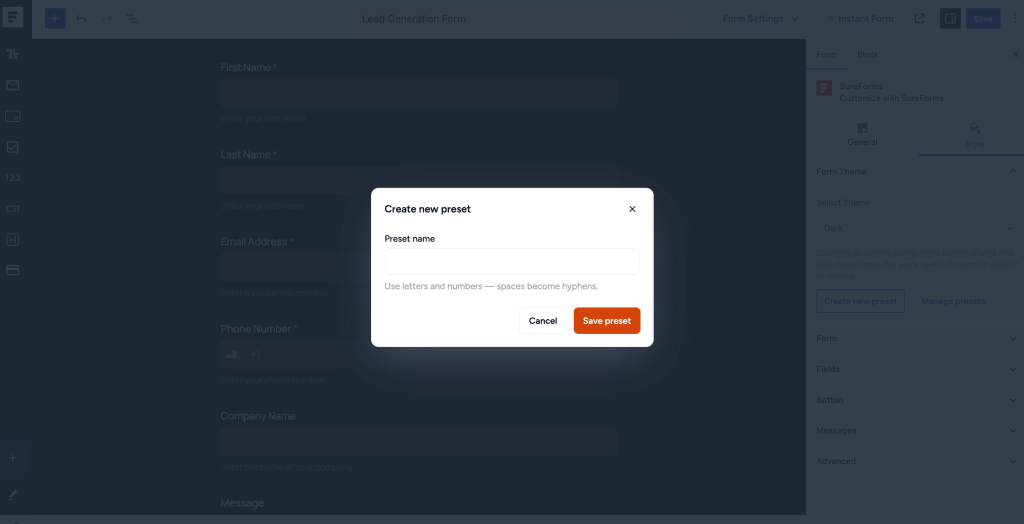
- Save the preset.
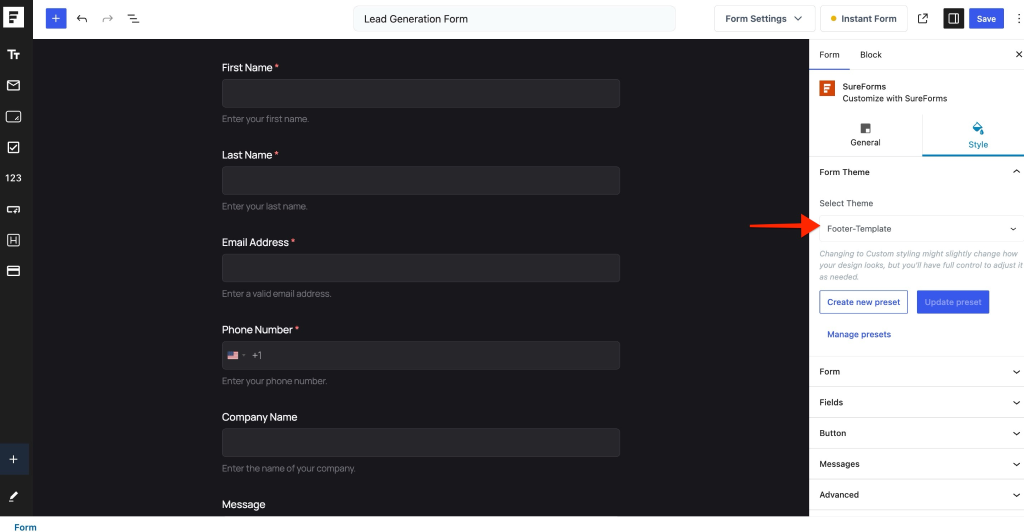
Your new preset will now be available globally across your website.
Reusing Presets Across Forms
Once a preset is created:
- Open any other form
- Go to the Styles tab
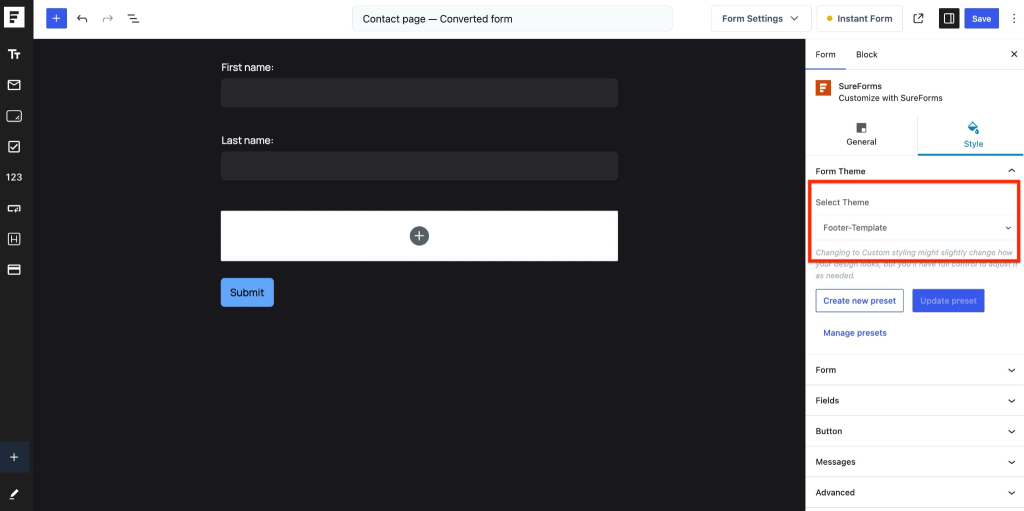
- Select your saved preset from the dropdown
The same styling will instantly apply to the new form.
This helps maintain consistent branding across all forms on your website.
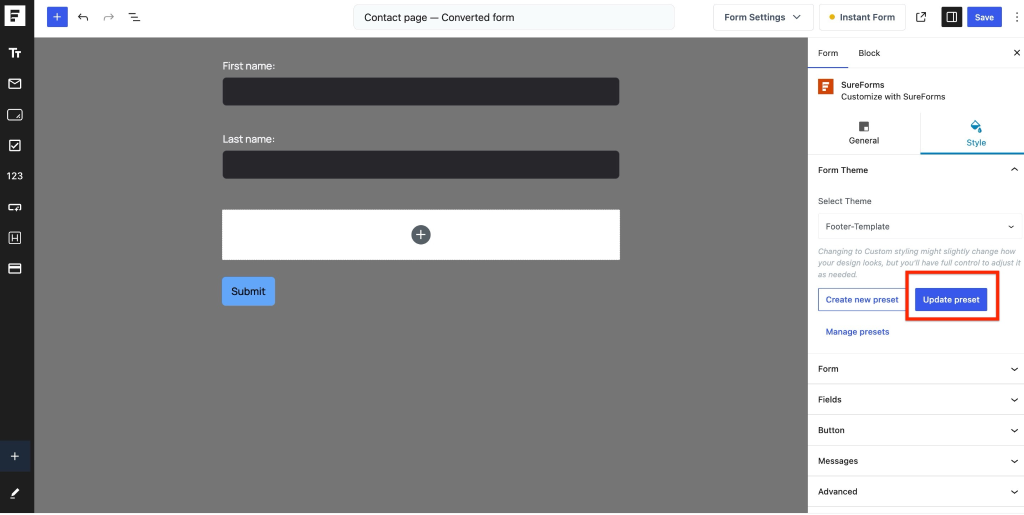
Updating Existing Presets
If you make changes to a preset-based form style, you can update the preset globally.
How It Works
- Modify the form styling
- Click Update Preset
- The preset will update automatically
- All forms using that preset will inherit the latest changes
This saves time and removes the need to manually update every form individually.
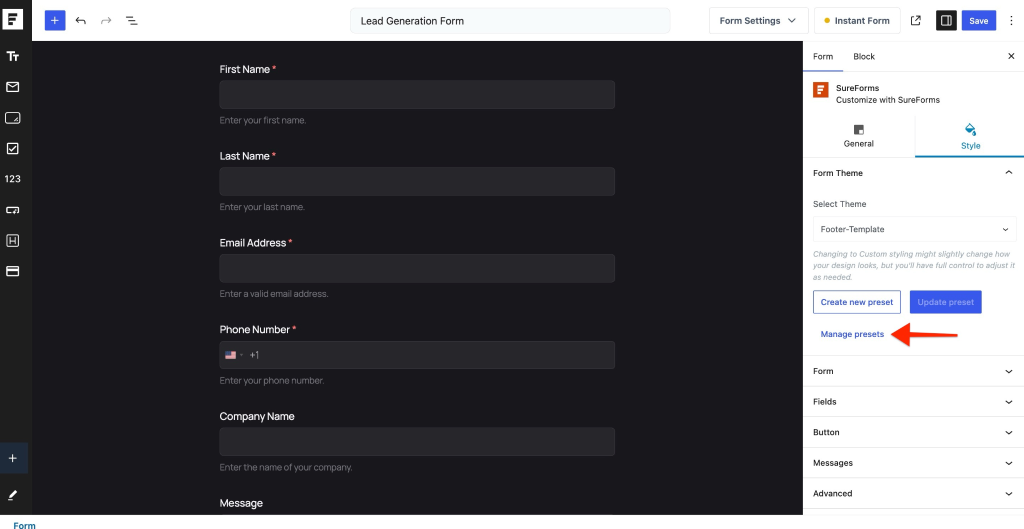
Manage Presets
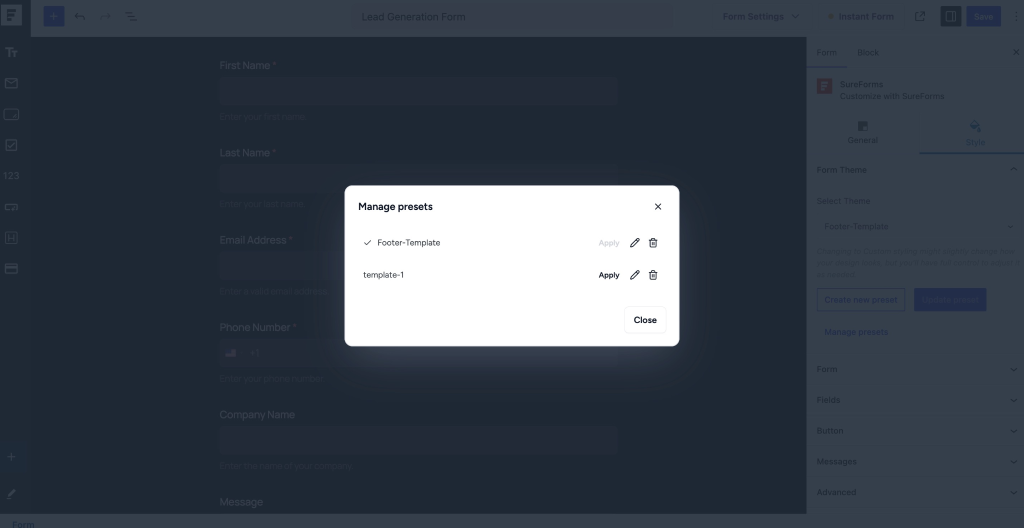
SureForms Pro also includes a Manage Presets option for easier organization.
Using this feature, you can:
- View all saved presets
- Apply presets to forms
- Rename presets
- Delete unused presets
This makes it easy to manage multiple form styles across large websites.
Benefits of the New Styling System
The new SureForms Pro styling system helps you:
- Build forms faster
- Maintain consistent branding
- Reuse styles globally
- Create modern-looking forms easily
- Reduce repetitive styling work
- Apply updates across multiple forms instantly
Conclusion
The new styling and preset features in SureForms Pro make form design faster, easier, and more flexible.
Whether you want a quick modern layout using built-in presets or a fully customized reusable design system, SureForms Pro now gives you the tools to manage form styling efficiently across your entire website.
We don't respond to the article feedback, we use it to improve our support content.