
- Creating and Publishing a Form
- Conversational Form
- Create Multi Step Forms In WordPress
- Using Calculations in SureForms: A Step-by-Step Guide
- Calculation Formula Guide
- SureForms Login Block – Step-by-Step Guide
- SureForms Registration Block – Step-by-Step Guide
- SureForms – PDF Generation Feature
- GDPR Compliant Forms
- Create WordPress Forms With Conditional Logic
- Adjust Form Notification Emails
- Form Confirmation
- Entries Management Feature Guide
- How to Add Query Parameters to Form Redirects
- How to Fetch Query Parameters from URL
- Set the “From Email” in SureForms
- Setting Up “Reply-To” Email Using Form Input Tags – SureForms
- Restrict Form Entries in SureForms
- Form Scheduling in SureForms
- Conditional Confirmations in SureForms
- How to Connect Your Stripe Account with SureForms
- How to Connect PayPal in SureForms
- How to Create a Payment Form in SureForms
- SureForms Payments
- How Refunds Work in SureForms Payments
- Understanding Payment Processing Fees
- How to Display the Payment Dashboard on the Frontend (SureForms)
- Enable One-Time Payment and Subscription in a Single Form
- SureForms Integration with ActiveCampaign
- SureForms Integration with AgileCRM
- SureForms Integration with Airtable
- SureForms Integration with LatePoint
- SureForms Integration with FluentCRM
- Connect SureForms To Zapier
- WordPress Forms with the Custom App Builder
- SureForms Integration with Telegram
- SureForms Integration with Breeze
- SureForms Integration with Brevo
- Unable to Upload SureForms ZIP: File Unzipped On Download
- Browser Support for SureForms
- Not Getting Update Notifications
- How To Rollback to Previous SureForms Versions
- Publishing Failed: Invalid JSON Response
- Troubleshooting Email Sending In SureForms
- SureForm Submissions Marked as Spam – How to Fix
- API Request Failed – Nonce Verification Error
- Fixing the “Destination folder already exists” Error When Installing SureForms
- How to Set Up SureForms with Caching Plugins
- srfm_enable_redirect_activation
- sureforms_plugin_action_links
- srfm_quick_sidebar_allowed_blocks
- srfm_integrated_plugins
- srfm_suretriggers_integration_data_filter
- srfm_form_submit_response
- srfm_enable_gutenberg_post_types
- srfm_languages_directory
- srfm_form_template
- srfm_disable_nps_survey
SureForms Abilities – Connect AI Clients to Your Forms
Introduction
SureForms Abilities is a powerful feature (available from version 2.5.2+) that allows AI clients like Claude, ChatGPT, and other MCP-compatible tools to interact directly with your forms.
Instead of navigating through the WordPress dashboard, you can simply ask your AI assistant to:
- List forms
- Create new forms
- View submissions
- Update settings
- Analyze data
This feature is built using the WordPress Abilities API and the Model Context Protocol (MCP).
That means SureForms works smoothly with AI clients without needing custom integrations.
Requirements
Before getting started, make sure you have:
- WordPress 6.9 or later
- SureForms 2.5.2 or later
- You need to install and activate the MCP Adapter plugin from GitHub: Get MCP Adapter.
- Administrator access (required permission: manage_options)
- Node.js 18+ installed (for MCP connection)
- An MCP-compatible AI client such as:
- Claude Desktop
- Claude Code
- Cursor
- Windsurf
Enabling Abilities
Go to: SureForms → Settings → MCP
You will see the Abilities settings page.
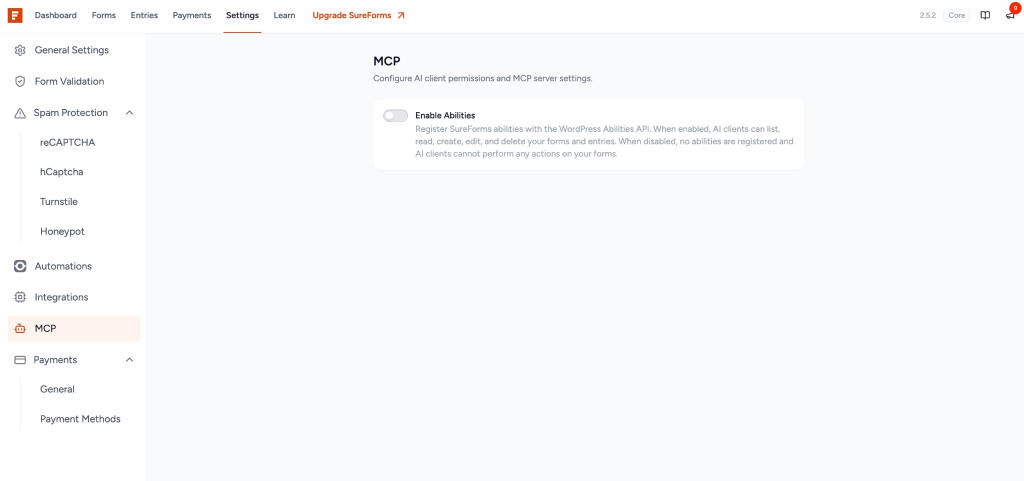
Step 1: Enable the Master Toggle
By default, all abilities are disabled.
Turn ON Enable Abilities to register SureForms abilities.
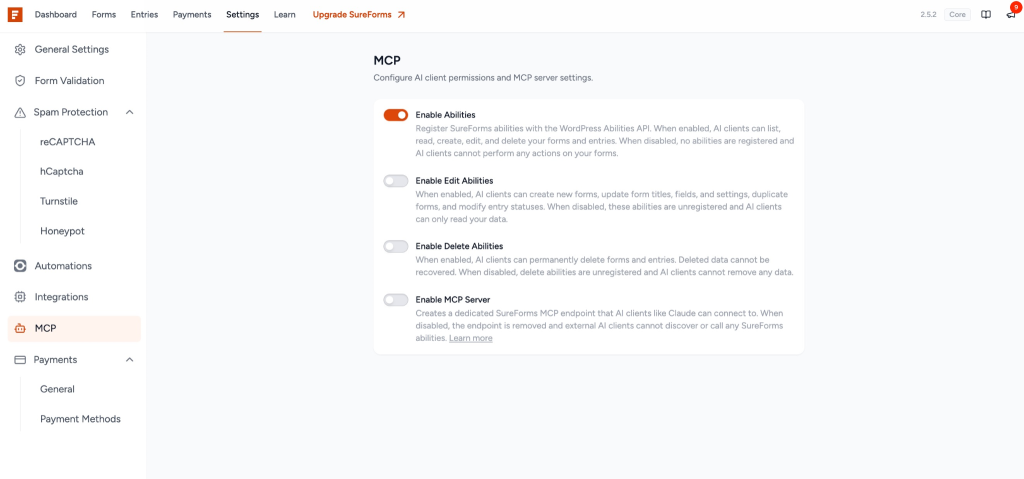
Once enabled, you will see:
- Edit Abilities
- Delete Abilities
- MCP Server
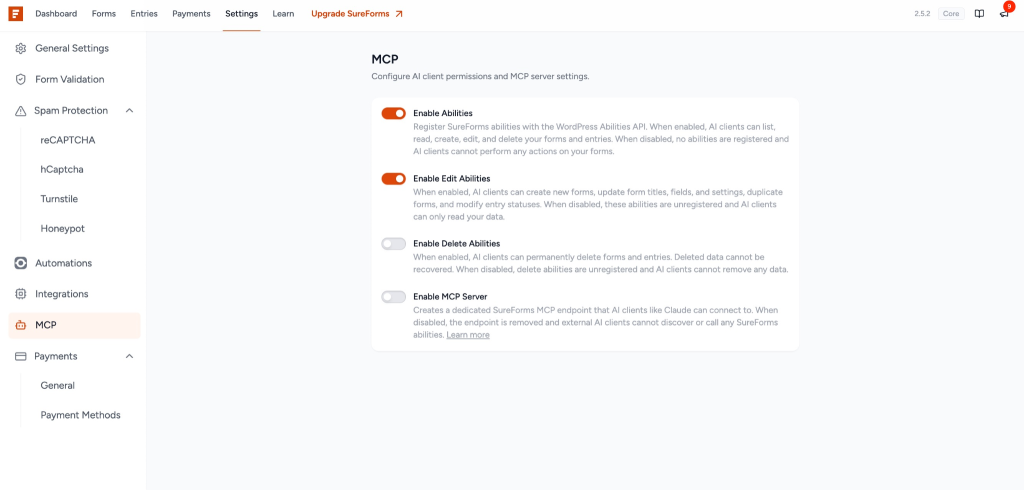
Step 2: Choose Your Permission Level
SureForms uses a progressive permission system:
| Toggle | What It Unlocks | Risk Level |
| Enable Abilities | Read-only access (view forms, entries, stats) | Low |
| Enable Edit Abilities | Create and update forms and entries | Medium |
| Enable Delete Abilities | Permanently delete forms and entries | High |
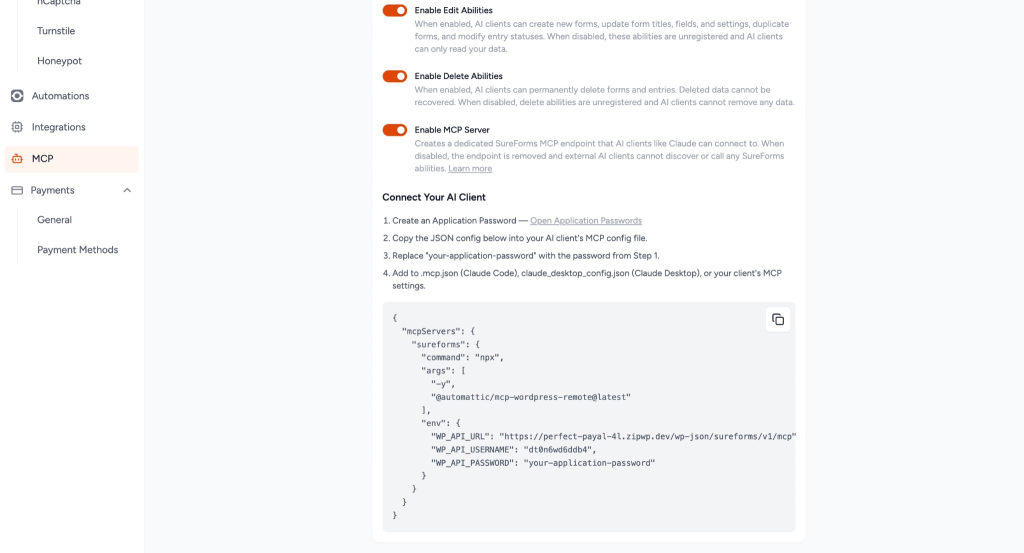
Step 3: Enable the MCP Server
Turn ON Enable MCP Server.
This creates an endpoint: /wp-json/sureforms/v1/mcp
When all toggles are enabled:
Setting Up the MCP Server
After enabling the MCP Server, you will see the setup instructions.
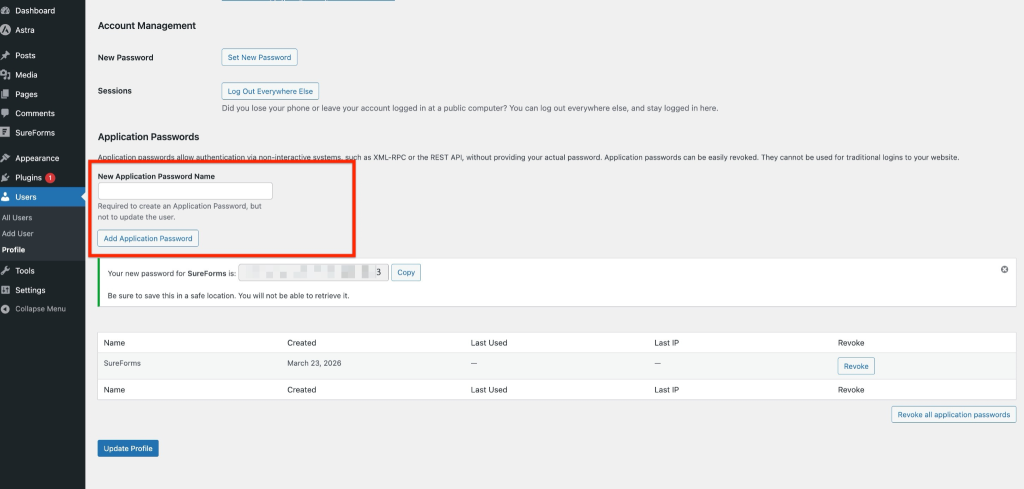
Step 1: Create an Application Password
Go to: Users → Profile → Application Passwords
- Enter a name (e.g., “Claude MCP”)
- Click Add New Application Password
- Copy the password
⚠️ You will not be able to see it again.
Step 2: Copy the JSON Configuration
Copy the config shown in the MCP settings page.
Paste it into your AI client:
- Claude Code → .mcp.json
- Claude Desktop → claude_desktop_config.json
- Others → Follow their docs
Step 3: Replace the Password
Update this part in the config:
“WP_API_PASSWORD”: “your-application-password”
Example:
{
  "mcpServers": {
    "sureforms": {
      "command": "npx",
      "args": ["-y", "@automattic/mcp-wordpress-remote@latest"],
      "env": {
        "WP_API_URL": "https://your-site.com/wp-json/sureforms/v1/mcp",
        "WP_API_USERNAME": "your-username",
        "WP_API_PASSWORD": "xxxx xxxx xxxx xxxx xxxx xxxx"
      }
    }
  }
}Available Abilities
SureForms includes 16 abilities grouped into modules.
Forms (8 Abilities)
| Ability | Description | Permission |
| list-forms | Get all forms | Read |
| get-form | Get form details | Read |
| get-shortcode | Get embed shortcode | Read |
| get-form-stats | View submission stats | Read |
| create-form | Create new form | Edit |
| update-form | Update form | Edit |
| duplicate-form | Duplicate form | Edit |
| delete-form | Delete form | Delete |
Entries (5 Abilities)
| Ability | Description | Permission |
| list-entries | View submissions | Read |
| get-entry | View single entry | Read |
| bulk-get-entries | Get multiple entries | Read |
| update-entry-status | Mark read/unread | Edit |
| delete-entry | Delete entries | Delete |
Settings (2 Abilities)
| Ability | Description | Permission |
| get-global-settings | View settings | Read |
| update-global-settings | Update settings | Edit |
Analytics (1 Ability)
| Ability | Description | Permission |
| get-form-analytics | View analytics data | Read |
Pro Field Types
With SureForms Pro, additional fields are supported:
- Hidden
- Rating
- File Upload
- Date Picker
- Time Picker
- Number Slider
- Signature
- Page Break
These are automatically available when:
- SureForms Pro is active
- Edit Abilities is enabled
Recommended Configurations
Read-Only (Safest)
Enable:
- Abilities
- MCP Server
Best for:
- Viewing data only
Safe Editing (Recommended)
Enable:
- Abilities
- Edit Abilities
- MCP Server
Best for:
- Daily use
Full Access
Enable all toggles.
⚠️ Use carefully — data deletion is permanent.
Security Notes
- Only admins can use abilities
- Uses secure Application Passwords
- Permissions can be controlled anytime
- Delete actions are permanent
- MCP endpoint is protected (no public access)
- Works per site (multisite supported)
Example Prompts
You can ask your AI:
- “Show all my forms.”
- “How many unread entries do I have?”
- “Create a feedback form with rating.”
- “Update form title”
- “Mark all entries as read.”
- “Delete old entries.”
Troubleshooting
AI cannot connect
- Check MCP Server is enabled
- Verify site URL
- Check password
- Ensure Node.js 18+ is installed
Abilities not showing
- Check WordPress version (6.9+)
- Enable Abilities toggle
- Enable Edit/Delete toggles if needed
Permission errors
- Only Administrator accounts work
- Check the user role linked to the Application Password
Final Notes
SureForms Abilities turns your forms into an AI-powered system, allowing automation, faster workflows, and better data handling, all securely within WordPress.
We don't respond to the article feedback, we use it to improve our support content.