
- Creating and Publishing a Form
- Conversational Form
- Create Multi Step Forms In WordPress
- Using Calculations in SureForms: A Step-by-Step Guide
- Calculation Formula Guide
- SureForms Login Block – Step-by-Step Guide
- SureForms Registration Block – Step-by-Step Guide
- SureForms – PDF Generation Feature
- GDPR Compliant Forms
- Create WordPress Forms With Conditional Logic
- Adjust Form Notification Emails
- Form Confirmation
- Entries Management Feature Guide
- How to Add Query Parameters to Form Redirects
- How to Fetch Query Parameters from URL
- Set the “From Email” in SureForms
- Setting Up “Reply-To” Email Using Form Input Tags – SureForms
- Restrict Form Entries in SureForms
- Form Scheduling in SureForms
- Conditional Confirmations in SureForms
- How to Connect Your Stripe Account with SureForms
- How to Connect PayPal in SureForms
- How to Create a Payment Form in SureForms
- SureForms Payments
- How Refunds Work in SureForms Payments
- Understanding Payment Processing Fees
- How to Display the Payment Dashboard on the Frontend (SureForms)
- Enable One-Time Payment and Subscription in a Single Form
- SureForms Integration with ActiveCampaign
- SureForms Integration with AgileCRM
- SureForms Integration with Airtable
- SureForms Integration with LatePoint
- SureForms Integration with FluentCRM
- Connect SureForms To Zapier
- WordPress Forms with the Custom App Builder
- SureForms Integration with Telegram
- SureForms Integration with Breeze
- SureForms Integration with Brevo
- Unable to Upload SureForms ZIP: File Unzipped On Download
- Browser Support for SureForms
- Not Getting Update Notifications
- How To Rollback to Previous SureForms Versions
- Publishing Failed: Invalid JSON Response
- Troubleshooting Email Sending In SureForms
- SureForm Submissions Marked as Spam – How to Fix
- API Request Failed – Nonce Verification Error
- Fixing the “Destination folder already exists” Error When Installing SureForms
- How to Set Up SureForms with Caching Plugins
- srfm_enable_redirect_activation
- sureforms_plugin_action_links
- srfm_quick_sidebar_allowed_blocks
- srfm_integrated_plugins
- srfm_suretriggers_integration_data_filter
- srfm_form_submit_response
- srfm_enable_gutenberg_post_types
- srfm_languages_directory
- srfm_form_template
- srfm_disable_nps_survey
Enable One-Time Payment and Subscription in a Single Form
SureForms allows you to accept both one-time payments and subscription payments within the same form. You can also give users the flexibility to choose their preferred payment option directly from the form.
This guide will walk you through the setup.
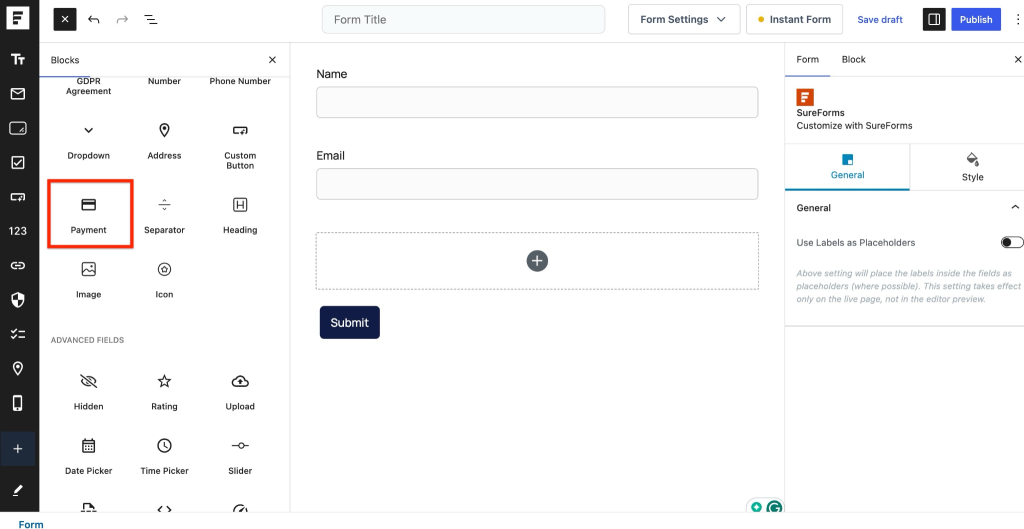
Step 1: Add the Payment Block
To begin, you need to add a payment option to your form.
- Open your form in the SureForms builder
- Add the Payment Block to your form
Step 2: Configure Payment Type
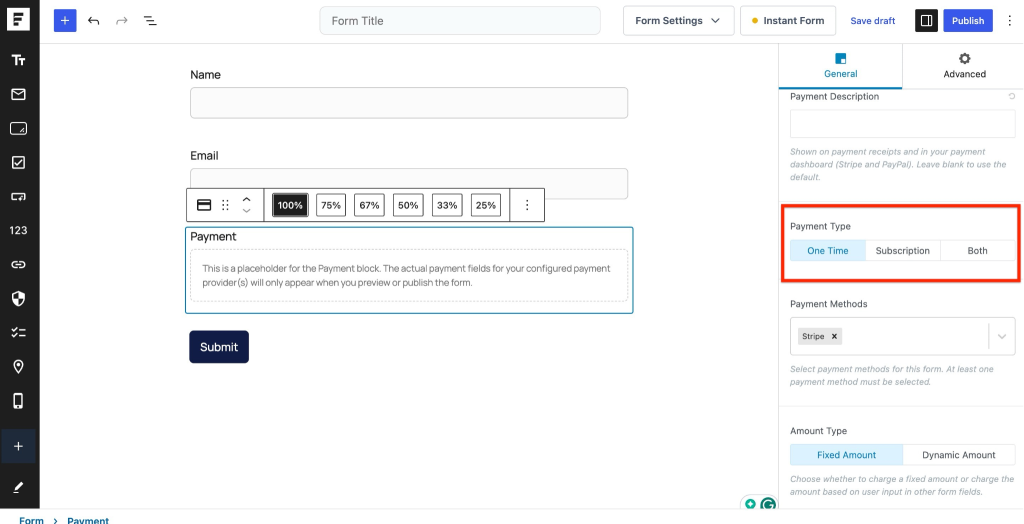
Once the Payment Block is added, you will see a Payment Type option in the settings.
You will have three options:
- One-Time Payment
- Subscription
- Both (One-Time + Subscription)
Step 3: Enable Both Payment Options
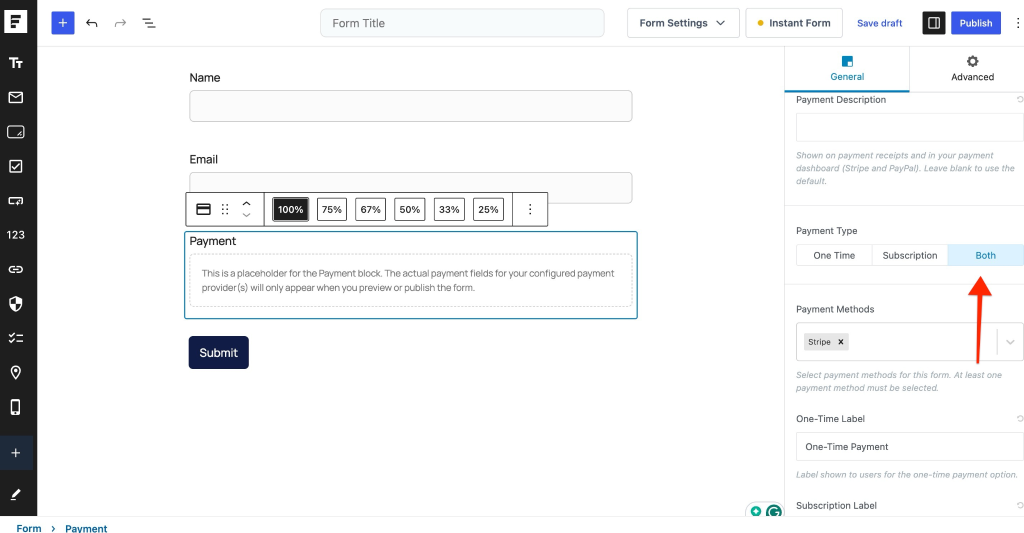
To allow users to choose between payment types:
- Select Both (One-Time + Subscription)
- Save the form
Step 4: Frontend User Experience
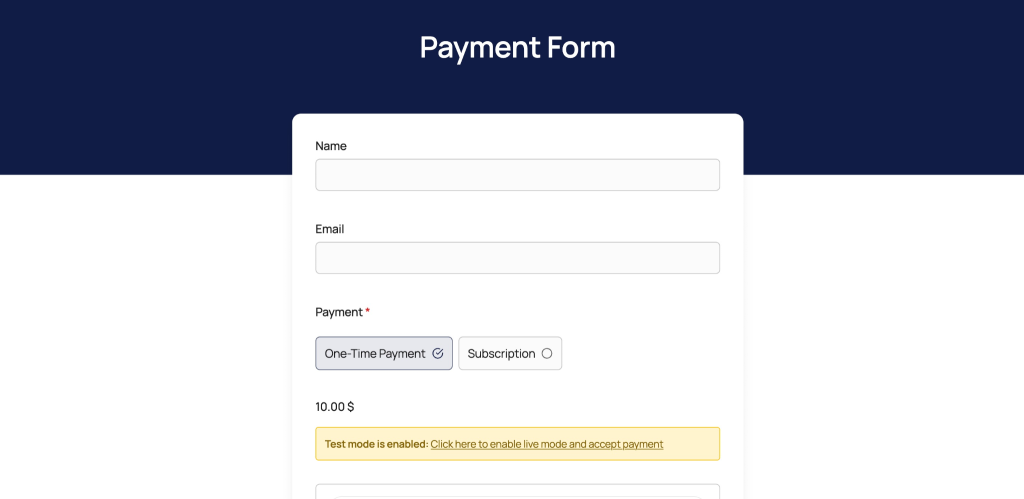
After enabling both options, your form will display two choices on the frontend:
- Pay Now (for one-time payment)
- Subscribe Now (for recurring payment)
Users can select the option that suits them before completing the payment.
Step 5: Collect Payments
Once configured:
- Users can complete payments directly through the form
- Payments will be processed based on the selected option (one-time or subscription)
This setup helps you offer flexible payment options without creating multiple forms.
We don't respond to the article feedback, we use it to improve our support content.