
- Creating and Publishing a Form
- Conversational Form
- Create Multi Step Forms In WordPress
- Using Calculations in SureForms: A Step-by-Step Guide
- Calculation Formula Guide
- SureForms Login Block – Step-by-Step Guide
- SureForms Registration Block – Step-by-Step Guide
- SureForms – PDF Generation Feature
- GDPR Compliant Forms
- Create WordPress Forms With Conditional Logic
- How to Create Inline Forms in SureForms
- How to Add Smart Tags as Default Values in SureForms
- Adding Custom Posts Using SureForms
- Validate as Unique in SureForms
- How to Use Conditional Logic in SureForms
- How to Use OttoKit with Repeater Field in SureForms
- How to Duplicate a Form in SureForms
- Custom Lost Password and Reset Password Pages
- Quiz Feature in SureForms
- SureForms – Survey & Polls Feature
- Using the Google Maps API with SureForms
- How to Move a Published Form to Draft Mode
- Convert HTML Forms to SureForms
- Hide the Submit Button Using Conditional Logic
- Show Views and Conversion Rate
- How to Enable and Manage Form Abandonment in SureForms
- Adjust Form Notification Emails
- Form Confirmation
- Entries Management Feature Guide
- How to Add Query Parameters to Form Redirects
- How to Fetch Query Parameters from URL
- Set the “From Email” in SureForms
- Setting Up “Reply-To” Email Using Form Input Tags – SureForms
- Restrict Form Entries in SureForms
- Form Scheduling in SureForms
- Conditional Confirmations in SureForms
- How to Connect Your Stripe Account with SureForms
- How to Connect PayPal in SureForms
- How to Create a Payment Form in SureForms
- SureForms Payments
- How Refunds Work in SureForms Payments
- Understanding Payment Processing Fees
- How to Display the Payment Dashboard on the Frontend (SureForms)
- Enable One-Time Payment and Subscription in a Single Form
- SureForms Integration with ActiveCampaign
- SureForms Integration with AgileCRM
- SureForms Integration with Airtable
- SureForms Integration with LatePoint
- SureForms Integration with FluentCRM
- Connect SureForms To Zapier
- WordPress Forms with the Custom App Builder
- SureForms Integration with Telegram
- SureForms Integration with Breeze
- SureForms Integration with Brevo
- Unable to Upload SureForms ZIP: File Unzipped On Download
- Browser Support for SureForms
- Not Getting Update Notifications
- How To Rollback to Previous SureForms Versions
- Publishing Failed: Invalid JSON Response
- Troubleshooting Email Sending In SureForms
- SureForm Submissions Marked as Spam – How to Fix
- API Request Failed – Nonce Verification Error
- Fixing the “Destination folder already exists” Error When Installing SureForms
- How to Set Up SureForms with Caching Plugins
- srfm_enable_redirect_activation
- sureforms_plugin_action_links
- srfm_quick_sidebar_allowed_blocks
- srfm_integrated_plugins
- srfm_suretriggers_integration_data_filter
- srfm_form_submit_response
- srfm_enable_gutenberg_post_types
- srfm_languages_directory
- srfm_form_template
- srfm_disable_nps_survey
Convert HTML Forms to SureForms
Introduction
With the Share Form feature, users can easily convert existing HTML forms into SureForms without manually recreating the form fields.
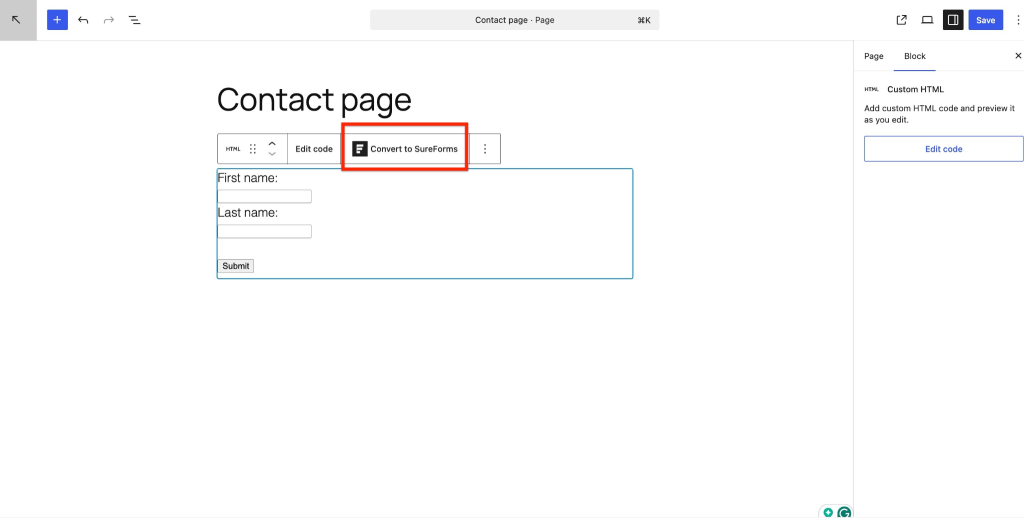
If a page, post, or custom post type (CPT) contains HTML code with a <form> tag, SureForms will automatically provide an option to convert that HTML form into a SureForm.
How the Conversion Works
Step 1: Detect Existing HTML Form
When SureForms detects HTML code containing a form tag on a page, post, or CPT, it displays an option to convert the form.
Step 2: Convert the HTML Form
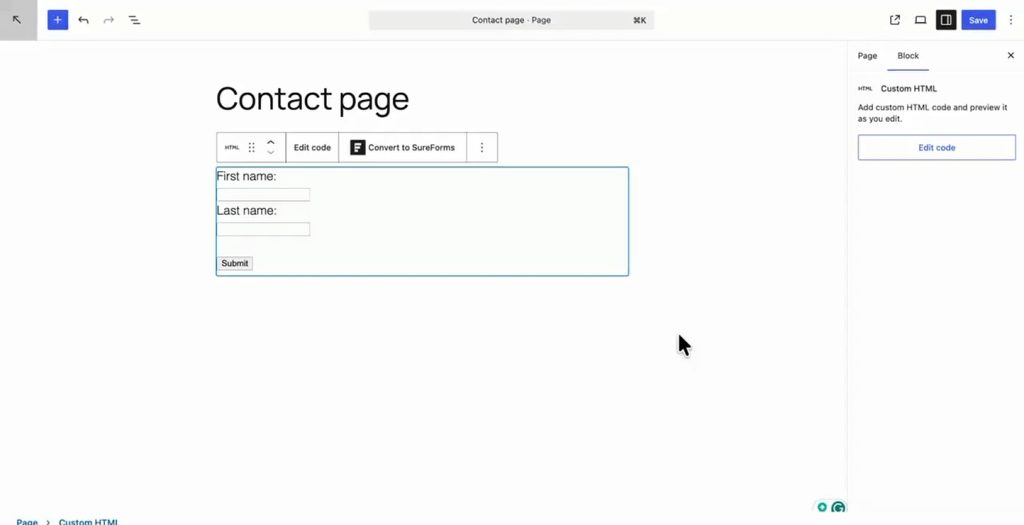
Click the Convert to Form option.
SureForms will automatically:
- Convert the existing HTML form into a SureForm
- Generate the form fields
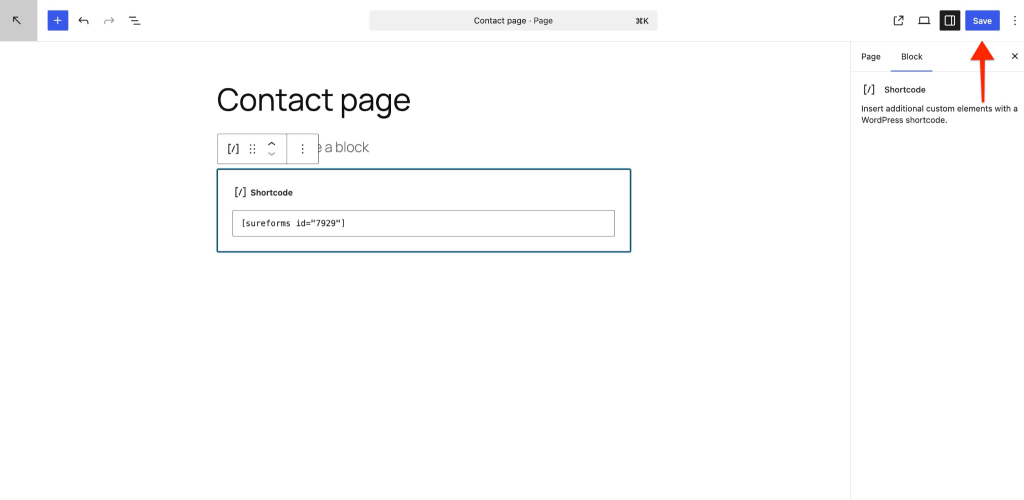
- Insert the SureForms shortcode into the page
[Add Screenshot Here – Convert to Form button]
Step 3: Publish the Page
Once the conversion is completed:
- The form shortcode will be added to the page
- Users can simply publish or update the page
- The form will become functional on the front end
Front-End Form Submission
After publishing the page:
- Visitors can fill out and submit the form from the front end
- Form submissions will be stored in SureForms entries

Viewing Form Entries
Users can view all submitted entries from the SureForms dashboard.
Navigate to:
SureForms → Entries
From there, users can:
- View submitted data
- Manage entries
- Access additional form-related features
Advanced Features
After converting the form, users can also enable advanced SureForms features depending on their requirements.
This may include:
- Notifications
- Integrations
- Conditional logic
- Spam protection
- Custom styling
Important Limitation
Before converting any HTML form, users are strongly recommended to take a complete backup of the page or website.
Reason
Once the HTML form is converted and changes are saved:
- The conversion cannot be reverted automatically
- The original HTML form code may not be restored
Because of this limitation, creating a backup before using the conversion feature is highly recommended.
We don't respond to the article feedback, we use it to improve our support content.