
- Creating and Publishing a Form
- Conversational Form
- Create Multi Step Forms In WordPress
- Using Calculations in SureForms: A Step-by-Step Guide
- Calculation Formula Guide
- SureForms Login Block – Step-by-Step Guide
- SureForms Registration Block – Step-by-Step Guide
- SureForms – PDF Generation Feature
- GDPR Compliant Forms
- Create WordPress Forms With Conditional Logic
- Adjust Form Notification Emails
- Form Confirmation
- Entries Management Feature Guide
- How to Add Query Parameters to Form Redirects
- How to Fetch Query Parameters from URL
- Set the “From Email” in SureForms
- Setting Up “Reply-To” Email Using Form Input Tags – SureForms
- Restrict Form Entries in SureForms
- Form Scheduling in SureForms
- Conditional Confirmations in SureForms
- How to Connect Your Stripe Account with SureForms
- How to Connect PayPal in SureForms
- How to Create a Payment Form in SureForms
- SureForms Payments
- How Refunds Work in SureForms Payments
- Understanding Payment Processing Fees
- How to Display the Payment Dashboard on the Frontend (SureForms)
- Enable One-Time Payment and Subscription in a Single Form
- SureForms Integration with ActiveCampaign
- SureForms Integration with AgileCRM
- SureForms Integration with Airtable
- SureForms Integration with LatePoint
- SureForms Integration with FluentCRM
- Connect SureForms To Zapier
- WordPress Forms with the Custom App Builder
- SureForms Integration with Telegram
- SureForms Integration with Breeze
- SureForms Integration with Brevo
- Unable to Upload SureForms ZIP: File Unzipped On Download
- Browser Support for SureForms
- Not Getting Update Notifications
- How To Rollback to Previous SureForms Versions
- Publishing Failed: Invalid JSON Response
- Troubleshooting Email Sending In SureForms
- SureForm Submissions Marked as Spam – How to Fix
- API Request Failed – Nonce Verification Error
- Fixing the “Destination folder already exists” Error When Installing SureForms
- How to Set Up SureForms with Caching Plugins
- srfm_enable_redirect_activation
- sureforms_plugin_action_links
- srfm_quick_sidebar_allowed_blocks
- srfm_integrated_plugins
- srfm_suretriggers_integration_data_filter
- srfm_form_submit_response
- srfm_enable_gutenberg_post_types
- srfm_languages_directory
- srfm_form_template
- srfm_disable_nps_survey
SureForms Free Entry Storage Limits Explained
SureForms Free does not impose a built-in limit on the number of form entries you can store. All entries are stored in your own WordPress database, so the available storage depends on your hosting environment.
How Does Entry Storage Work?
When a visitor submits a form, SureForms stores the submission in a custom database table named wp_sureforms_entries on your WordPress website.
Since the entries are stored in your own database, SureForms does not enforce a platform-level cap on the number of entries you can save in the Free version.
What Determines the Number of Entries You Can Store?
The number of entries you can retain primarily depends on the following factors:
- Database storage: The amount of database space available on your hosting server.
- Hosting limits: Any database size or resource restrictions imposed by your hosting provider.
- Entry size: The amount of data stored in each submission, including text fields and other submitted information.
- Website performance: A large number of entries can increase database size and may affect performance, depending on your hosting resources and database optimization.
How Can I Manage My Entries?
To view your form submissions:
- Log in to your WordPress dashboard.
- Navigate to SureForms → Entries.
- Select the relevant form to view its submissions.
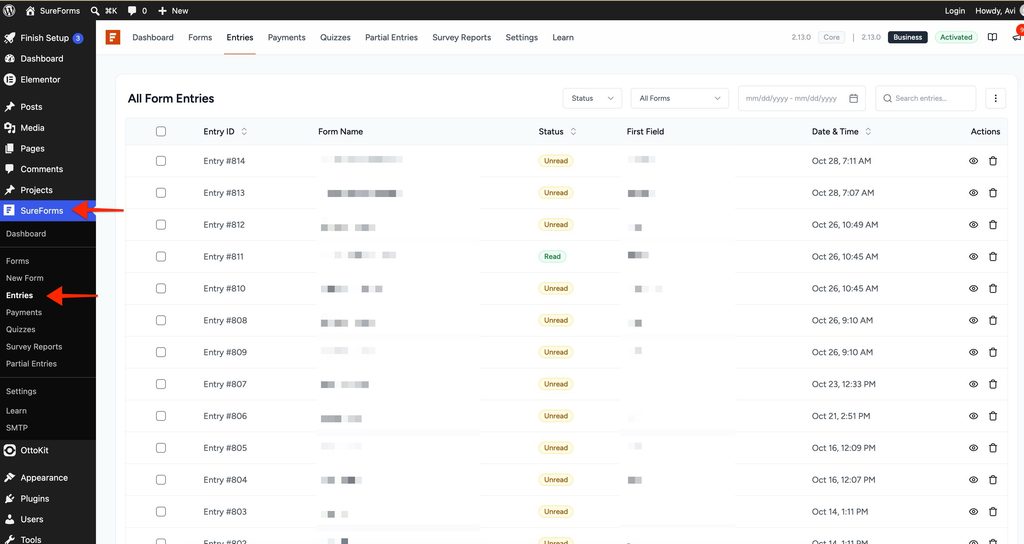
You can periodically review your entries and export or back up important data before removing submissions you no longer need.
Frequently Asked Questions
Does SureForms Free have a limit on the number of entries?
No. SureForms Free does not impose a built-in limit on the number of entries you can store. The practical limit depends on your hosting provider’s database capacity and resource restrictions.
Where are SureForms entries stored?
Entries are stored in the wp_sureforms_entries database table on your WordPress website. The wp_ prefix may differ depending on your WordPress database table prefix.
Do I need to upgrade to store more entries?
No. You do not need to upgrade solely to increase the number of stored entries because SureForms Free does not impose a built-in entry storage cap.
What happens if my database runs out of space?
If your hosting environment reaches its database storage or resource limits, your website or form submissions may be affected. Contact your hosting provider to review your available resources and database limits.
Summary
SureForms Free does not have a built-in entry storage cap. Form submissions are stored in your WordPress database, and the practical storage capacity depends on your hosting plan, available database space, and server resources.
We don't respond to the article feedback, we use it to improve our support content.