
- Creating and Publishing a Form
- Conversational Form
- Create Multi Step Forms In WordPress
- Using Calculations in SureForms: A Step-by-Step Guide
- Calculation Formula Guide
- SureForms Login Block – Step-by-Step Guide
- SureForms Registration Block – Step-by-Step Guide
- SureForms – PDF Generation Feature
- GDPR Compliant Forms
- Create WordPress Forms With Conditional Logic
- Adjust Form Notification Emails
- Form Confirmation
- Entries Management Feature Guide
- How to Add Query Parameters to Form Redirects
- How to Fetch Query Parameters from URL
- Set the “From Email” in SureForms
- Setting Up “Reply-To” Email Using Form Input Tags – SureForms
- Restrict Form Entries in SureForms
- Form Scheduling in SureForms
- Conditional Confirmations in SureForms
- How to Connect Your Stripe Account with SureForms
- How to Connect PayPal in SureForms
- How to Create a Payment Form in SureForms
- SureForms Payments
- How Refunds Work in SureForms Payments
- Understanding Payment Processing Fees
- How to Display the Payment Dashboard on the Frontend (SureForms)
- Enable One-Time Payment and Subscription in a Single Form
- SureForms Integration with ActiveCampaign
- SureForms Integration with AgileCRM
- SureForms Integration with Airtable
- SureForms Integration with LatePoint
- SureForms Integration with FluentCRM
- Connect SureForms To Zapier
- WordPress Forms with the Custom App Builder
- SureForms Integration with Telegram
- SureForms Integration with Breeze
- SureForms Integration with Brevo
- Unable to Upload SureForms ZIP: File Unzipped On Download
- Browser Support for SureForms
- Not Getting Update Notifications
- How To Rollback to Previous SureForms Versions
- Publishing Failed: Invalid JSON Response
- Troubleshooting Email Sending In SureForms
- SureForm Submissions Marked as Spam – How to Fix
- API Request Failed – Nonce Verification Error
- Fixing the “Destination folder already exists” Error When Installing SureForms
- How to Set Up SureForms with Caching Plugins
- srfm_enable_redirect_activation
- sureforms_plugin_action_links
- srfm_quick_sidebar_allowed_blocks
- srfm_integrated_plugins
- srfm_suretriggers_integration_data_filter
- srfm_form_submit_response
- srfm_enable_gutenberg_post_types
- srfm_languages_directory
- srfm_form_template
- srfm_disable_nps_survey
Migrate WPForms to SureForms
SureForms makes it easy to migrate your existing WPForms forms without rebuilding them from scratch.
Before You Begin
Make sure:
- SureForms is installed and activated.
- WPForms is installed on your website.
- You have administrator access.
Step 1: Access the Migration Tool
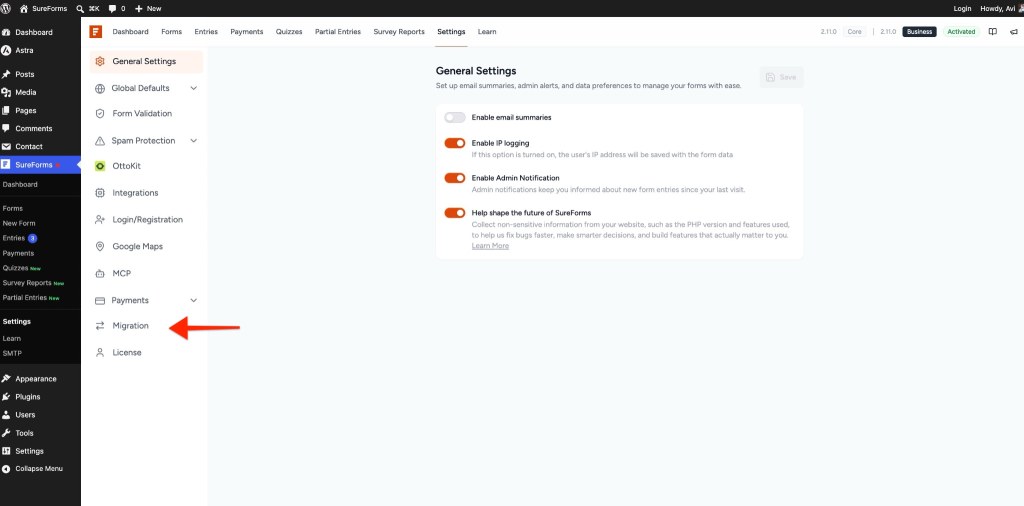
- Go to SureForms > Settings.
- Click the Migration tab.
Step 2: Select WPForms
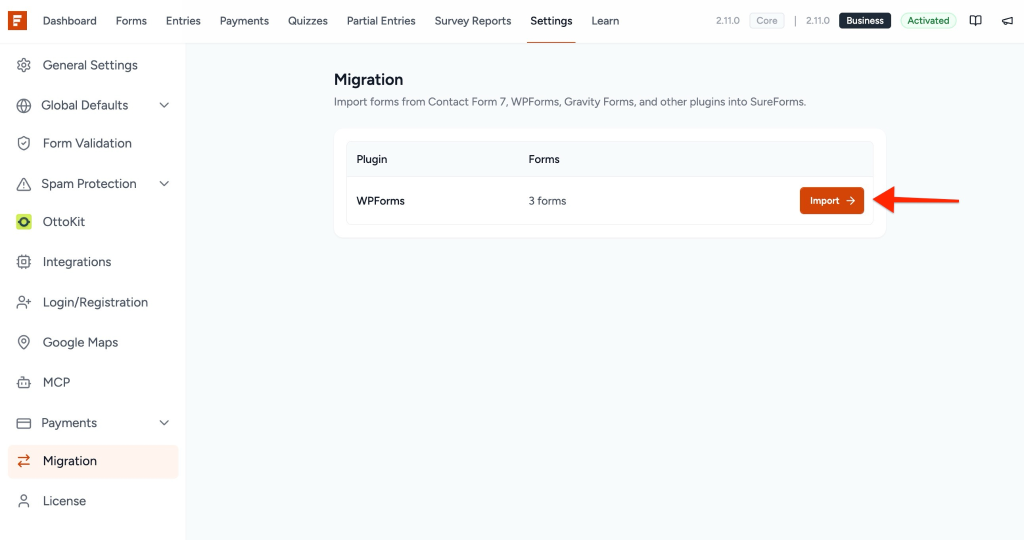
On the Migration screen, locate WPForms and click Import.
You will also see the number of forms available for migration.
Step 3: Choose a Form to Import
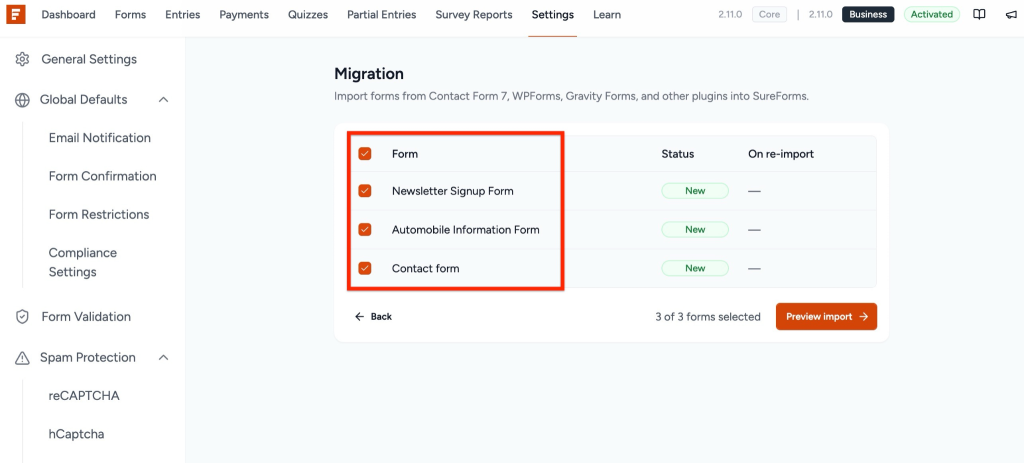
- Select the WPForms form you want to migrate.
- Click Preview Import.
Step 4: Preview and Import
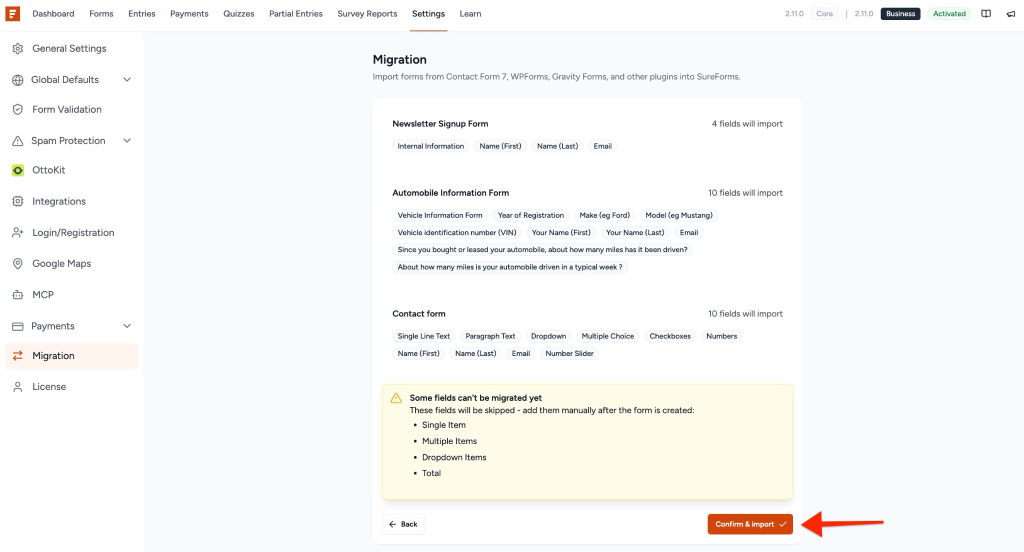
Review the imported fields and form structure.
If everything looks correct, click Confirm & Import.
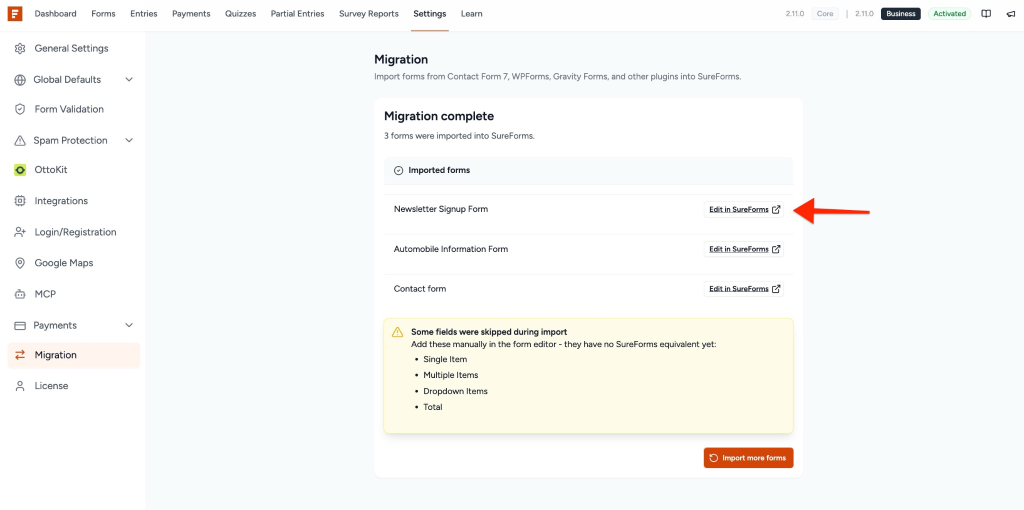
Step 5: Open the Imported Form
Once the migration is completed, click Edit in SureForms.
The imported form will open in the SureForms builder.
Review Form Settings
After migration, verify:
- Form fields
- Labels and placeholders
- Email notifications
- Confirmation messages
- Hidden fields
- Integrations
Any custom code or advanced WPForms functionality should be reviewed manually.
Verify Smart Tags
WPForms uses its own smart tag format, which may differ from SureForms.
Review:
- Notification emails
- Confirmation messages
- Integrations
- Dynamic field values
Update any unsupported or custom smart tags.
Publish and Embed
Imported forms remain in Draft mode until published.
Before publishing:
- Test form submissions
- Verify notifications
- Check smart tags
- Review integrations
Once verified, publish the form and embed it on your website.
We don't respond to the article feedback, we use it to improve our support content.