
- Creating and Publishing a Form
- Conversational Form
- Create Multi Step Forms In WordPress
- Using Calculations in SureForms: A Step-by-Step Guide
- Calculation Formula Guide
- SureForms Login Block – Step-by-Step Guide
- SureForms Registration Block – Step-by-Step Guide
- SureForms – PDF Generation Feature
- GDPR Compliant Forms
- Create WordPress Forms With Conditional Logic
- Adjust Form Notification Emails
- Form Confirmation
- Entries Management Feature Guide
- How to Add Query Parameters to Form Redirects
- How to Fetch Query Parameters from URL
- Set the “From Email” in SureForms
- Setting Up “Reply-To” Email Using Form Input Tags – SureForms
- Restrict Form Entries in SureForms
- Form Scheduling in SureForms
- Conditional Confirmations in SureForms
- How to Connect Your Stripe Account with SureForms
- How to Connect PayPal in SureForms
- How to Create a Payment Form in SureForms
- SureForms Payments
- How Refunds Work in SureForms Payments
- Understanding Payment Processing Fees
- How to Display the Payment Dashboard on the Frontend (SureForms)
- Enable One-Time Payment and Subscription in a Single Form
- SureForms Integration with ActiveCampaign
- SureForms Integration with AgileCRM
- SureForms Integration with Airtable
- SureForms Integration with LatePoint
- SureForms Integration with FluentCRM
- Connect SureForms To Zapier
- WordPress Forms with the Custom App Builder
- SureForms Integration with Telegram
- SureForms Integration with Breeze
- SureForms Integration with Brevo
- Unable to Upload SureForms ZIP: File Unzipped On Download
- Browser Support for SureForms
- Not Getting Update Notifications
- How To Rollback to Previous SureForms Versions
- Publishing Failed: Invalid JSON Response
- Troubleshooting Email Sending In SureForms
- SureForm Submissions Marked as Spam – How to Fix
- API Request Failed – Nonce Verification Error
- Fixing the “Destination folder already exists” Error When Installing SureForms
- How to Set Up SureForms with Caching Plugins
- How to Set Up SureForms with WP Rocket
- How to Set Up SureForms with W3 Total Cache
- How to Set Up SureForms with WP Fastest Cache
- How to Set Up SureForms with LiteSpeed Cache
- How to Set Up SureForms with SiteGround Optimizer
- How to Set Up SureForms with Autoptimize
- How to Enable Logs in SureForms
- srfm_enable_redirect_activation
- sureforms_plugin_action_links
- srfm_quick_sidebar_allowed_blocks
- srfm_integrated_plugins
- srfm_suretriggers_integration_data_filter
- srfm_form_submit_response
- srfm_enable_gutenberg_post_types
- srfm_languages_directory
- srfm_form_template
- srfm_disable_nps_survey
How to Set Up SureForms with WP Rocket
Use this guide to configure WP Rocket while keeping SureForms submissions, field validation, and payments working.
Before you begin
Update SureForms and your optimization plugin. Save your current settings and test changes on a staging site when possible. Avoid running the same JavaScript optimization in multiple plugins.
With SureForms 2.6.0 or later, form pages generally do not need a page-cache exclusion. SureForms uses a time-based security token instead of a WordPress nonce. Do not treat the token’s validity as an unlimited cache lifetime. For older versions, update or exclude pages containing forms.
1. Keep dynamic requests out of page caching
Open Settings → WP Rocket → Advanced Rules. Add these entries to Never Cache URL(s), one per line, then save:
/wp-json/sureforms/
/wp-json/sureforms/(.*)
/wp-json/sureforms-pro/
/wp-json/sureforms-pro/(.*)
/wp-admin/admin-ajax.phpThe base paths and their (.*) rules cover the namespaces and their child routes. Do not add /(.*) by itself: that would exclude your whole website.
The SureForms namespace covers submissions and Stripe webhooks. The Pro namespace covers Pro features and PayPal webhooks. admin-ajax.php handles requests such as payment intent creation. Omit the Pro rule if Pro is not installed.
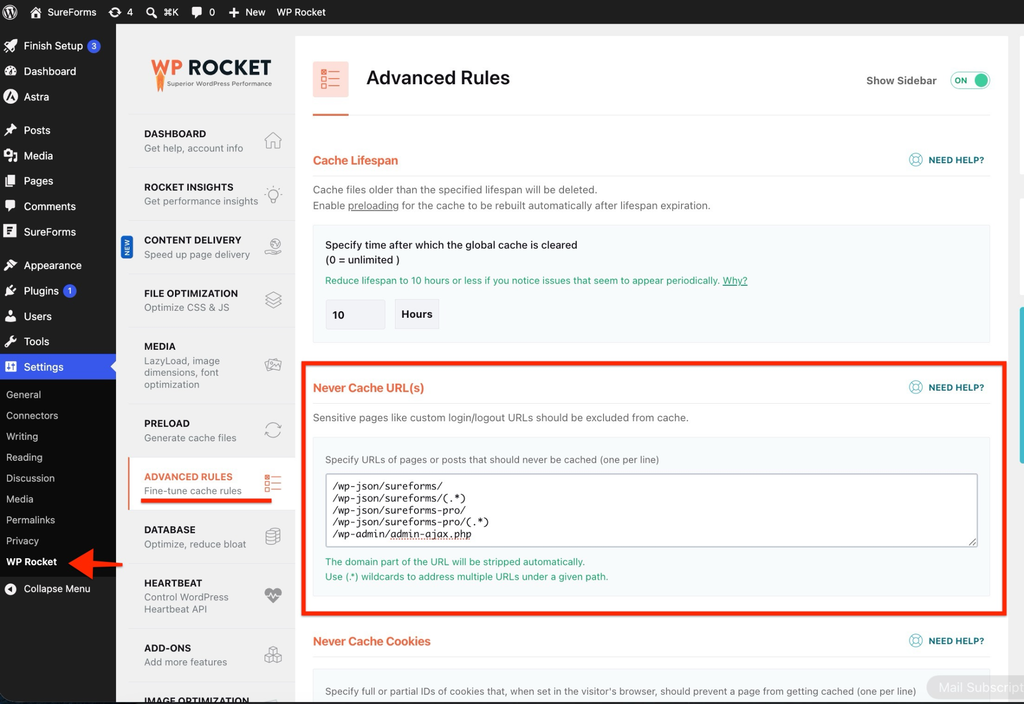
Reference: WP Rocket URL exclusions
2. Exclude SureForms JavaScript
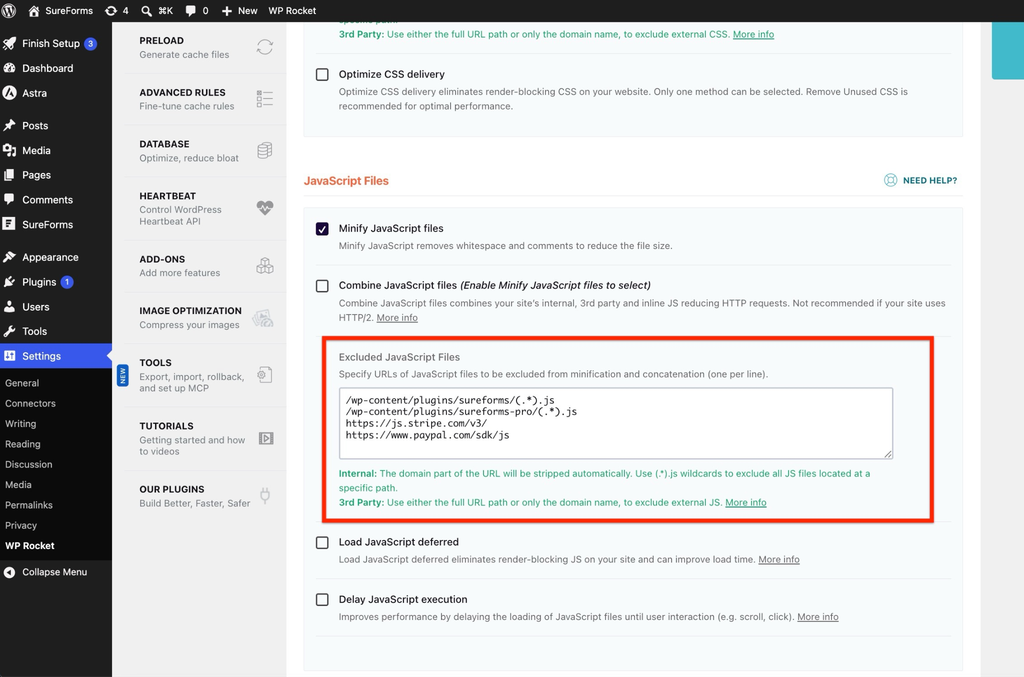
Open File Optimization → JavaScript Files. Under Minify JavaScript files, add the following to Excluded JavaScript Files, one per line. Keep existing exclusions and save.
/wp-content/plugins/sureforms/(.*).js
/wp-content/plugins/sureforms-pro/(.*).js
https://js.stripe.com/v3/
https://www.paypal.com/sdk/jsThe local patterns cover the plugin folders. If scripts use rewritten URLs, copy the original file URLs from the browser’s Network panel instead. Exclude the actual PayPal SDK URL if it includes query parameters.
Reference: WP Rocket minification exclusions
SureForms scripts to identify
Core: formSubmit.js and frontend.min.js. Payments: stripe-payment.js and payment-manager.js. These are normally under the sureforms plugin folder.
Pro, when active: pageBreak.js, datePicker.js, conditional-logic.min.js, file-upload.js, signature.js, signature_pad.umd.min.js, repeater.js, and the Save & Resume bundle. Find their actual URLs under the sureforms-pro folder or the browser’s Network panel; filenames can change.
3. Check script loading options
If Load JavaScript deferred or Delay JavaScript execution is enabled, add the following keywords to each feature’s separate Excluded JavaScript Files field. Saving a minification exclusion does not replace these exclusions.
plugins/sureforms/
plugins/sureforms-pro/
js.stripe.com
paypal.com/sdk/js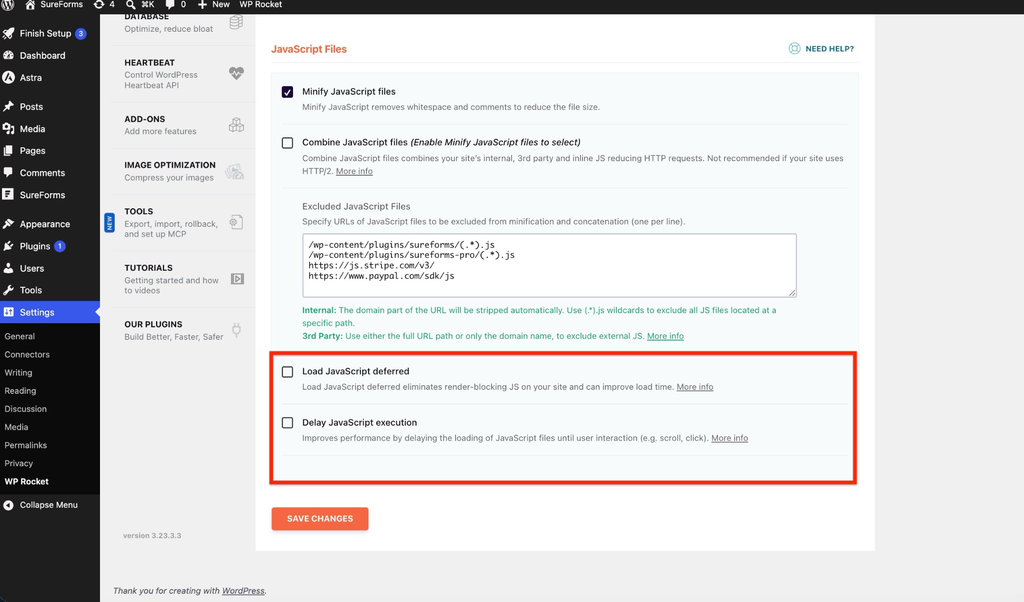
Reference: WP Rocket delay exclusions
A plugin folder exclusion does not necessarily exclude inline initialization code or WordPress dependencies. If the console reports a missing variable, ask support to identify the related script and its dependency rather than excluding all JavaScript.
4. Keep payment scripts external
For payment forms, ensure Stripe.js loads directly from Stripe and the PayPal SDK loads directly from PayPal. Do not combine them into local bundles, block them, or replace them with locally cached copies.
https://js.stripe.com/v3/
https://www.paypal.com/sdk/jsUse the actual SDK URL loaded by your form when an exact URL is required. PayPal URLs can include query parameters. These external scripts do not belong in your site’s page-cache URL exclusion list.
5. Clear the cache and test
Save changes, then use WP Rocket’s Clear Cache action. If a host or CDN also caches the site, purge its page cache too.
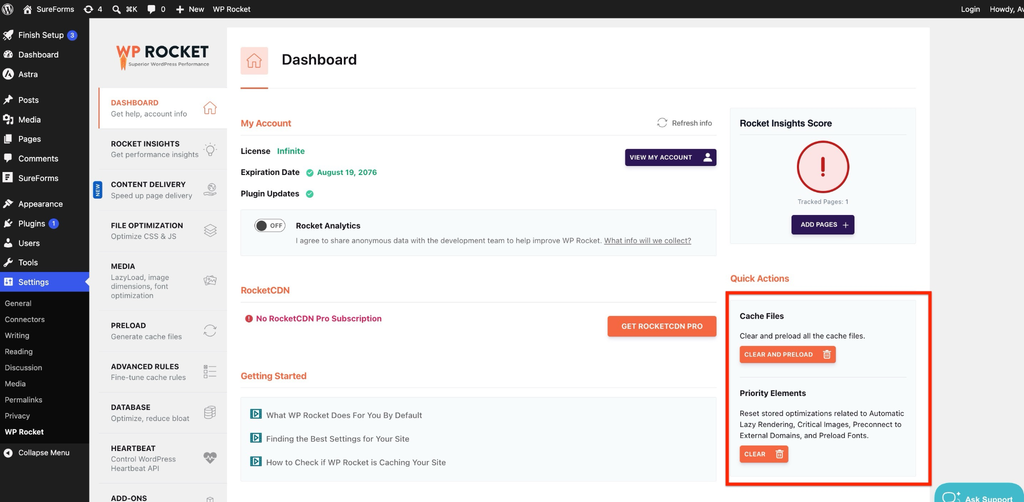
Open the form in a private or incognito window. Test once, reload, then test again so the checks include cached pages. Repeat on desktop and mobile.
Submit a test entry. Confirm the success message or redirect and the saved entry under SureForms → Entries.
Check required fields, multi-step navigation, conditional logic, uploads, and other active Pro features.
For payments, use test or sandbox mode. Confirm fields load, payment completes, and the status updates. Check Save & Resume if enabled.
Troubleshooting
Temporarily disable Minify JavaScript files, Load JavaScript deferred, and Delay JavaScript execution. Clear the cache and retest, then re-enable one setting at a time.
If submissions still fail, inspect the /wp-json/sureforms/ request in Developer Tools → Network. Check the status and JSON response. HTML can indicate caching, a redirect, or a security block; it does not prove a cache problem.
We don't respond to the article feedback, we use it to improve our support content.