
- Enable IP Logging
- Form Confirmation
- How to Add Query Parameters to Form Redirects
- Restrict Form Entries in SureForms
- Form Restriction in SureForms
- Form Scheduling in SureForms
- Conditional Confirmations in SureForms
- Global Defaults in SureForms
- How to Enable Distraction Free Mode in SureForms
- Manage Features in SureForms
- Create Multi Step Forms In WordPress
- Create WordPress Forms With Conditional Logic
- How to Fetch Query Parameters from URL
- Conversational Form
- Using Calculations in SureForms: A Step-by-Step Guide
- Calculation Formula Guide
- SureForms – PDF Generation Feature
- How to Add Smart Tags as Default Values in SureForms
- Adding Custom Posts Using SureForms
- How to Use Conditional Logic in SureForms
- How to Connect Your Stripe Account with SureForms
- How to Connect PayPal in SureForms
- How to Create a Payment Form in SureForms
- SureForms Payments
- How Refunds Work in SureForms Payments
- Understanding Payment Processing Fees
- How to Display the Payment Dashboard on the Frontend (SureForms)
- Enable One-Time Payment and Subscription in a Single Form
- SureForms Integration with ActiveCampaign
- SureForms Integration with AgileCRM
- SureForms Integration with Airtable
- SureForms Integration with LatePoint
- SureForms Integration with FluentCRM
- Connect SureForms To Zapier
- WordPress Forms with the Custom App Builder
- SureForms Integration with Telegram
- SureForms Integration with Breeze
- SureForms Integration with Brevo
- srfm_enable_redirect_activation
- sureforms_plugin_action_links
- srfm_quick_sidebar_allowed_blocks
- srfm_integrated_plugins
- srfm_suretriggers_integration_data_filter
- srfm_form_submit_response
- srfm_enable_gutenberg_post_types
- srfm_languages_directory
- srfm_form_template
- srfm_disable_nps_survey
- Unable to Upload SureForms ZIP: File Unzipped On Download
- Not Getting Update Notifications
- How To Rollback to Previous SureForms Versions
- Publishing Failed: Invalid JSON Response
- Troubleshooting Email Sending In SureForms
- SureForm Submissions Marked as Spam – How to Fix
- API Request Failed – Nonce Verification Error
- Fixing the “Destination folder already exists” Error When Installing SureForms
- How to Set Up SureForms with Caching Plugins
- How to Set Up SureForms with WP Rocket
Webhooks
This Feature Is Part of Premium Plan
Webhooks in SureForms allow you to send form submission data to external services in real-time. This enables seamless integration with CRMs, automation tools, and other third-party applications.
Setting Up Webhooks in SureForms
Navigate to Webhook Settings
- Go to your SureForms dashboard.
- Select the form you want to connect.
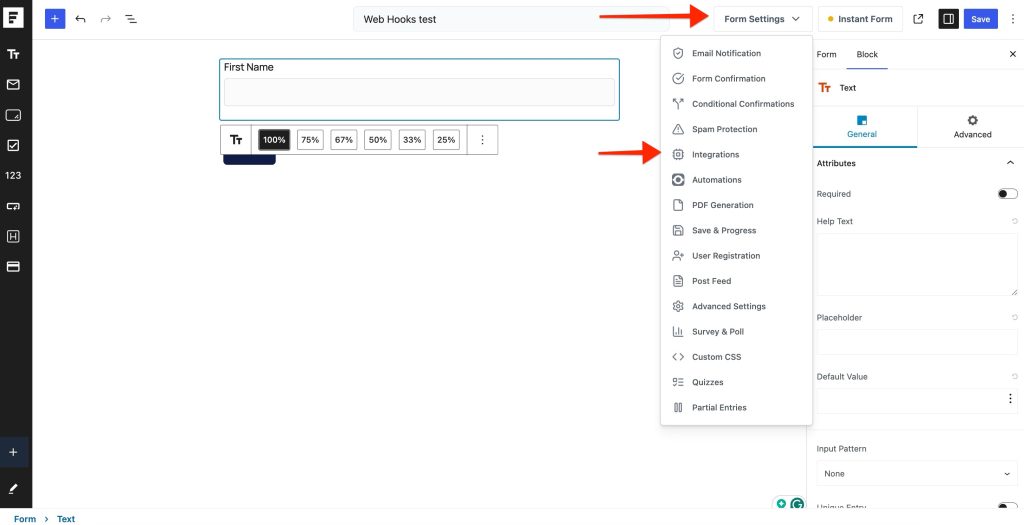
- Click Form Setting > Integrations option
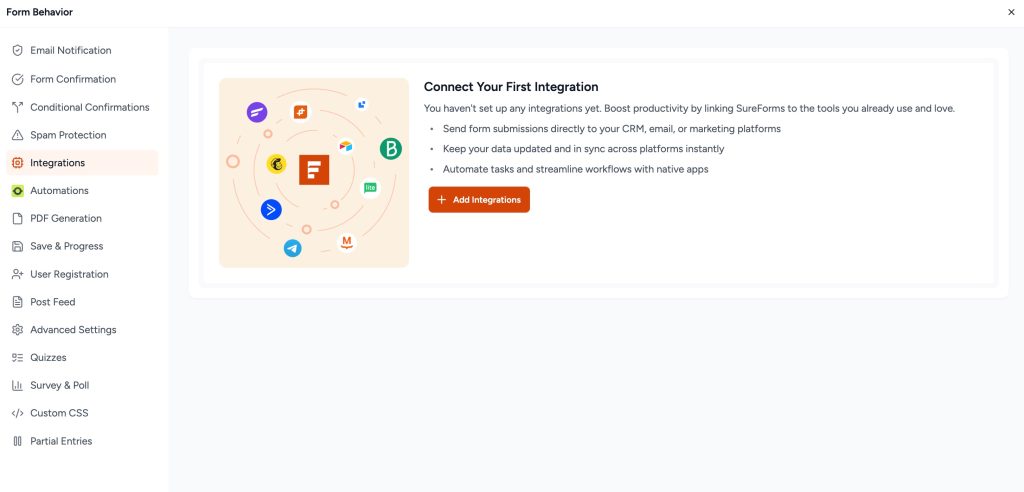
- Click Add Integrations
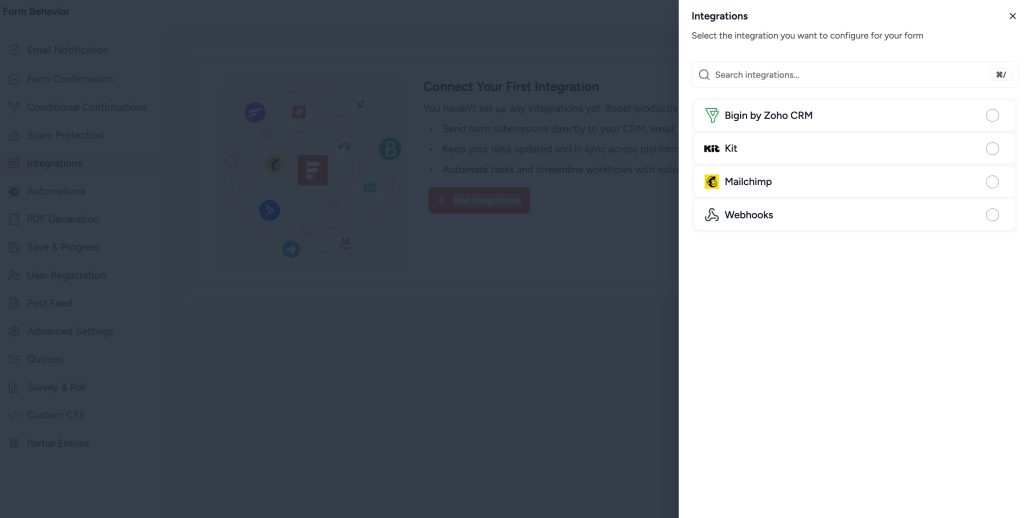
- Choose Webhooks.
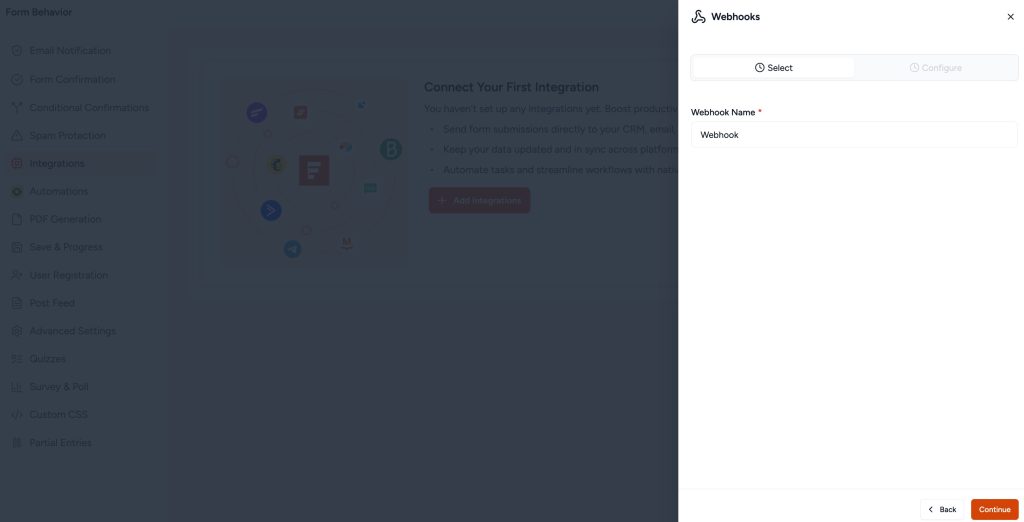
- Add Name
- Add Request URL
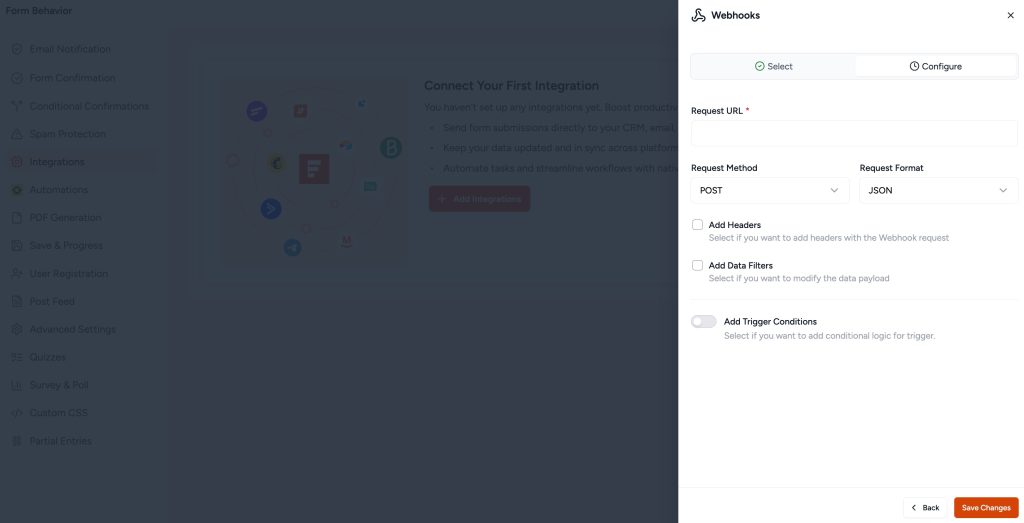
2. Configure Webhook Details
- Enter a Webhook Name.
- Provide the Request URL (the endpoint where the data will be sent).
- Select the Request Method from the dropdown options:
- POST
- GET
- PUT
- PATCH
- DELETE
- Set the Request Format to JSON.
- (Optional) Add Headers if needed for authentication or additional parameters.
- (Optional) Add Data Filters to modify the data payload before sending.
- (Optional) Set Trigger Conditions to apply conditional logic for execution.
3. Save Your Webhook
- Click Save to store your webhook settings in WordPress.
Your webhook is now successfully configured and will trigger based on the defined conditions.
Common Use Cases
- CRM Integration: Send form data to HubSpot, Salesforce, or other CRMs.
- Email Marketing: Automate lead capture in Mailchimp or ConvertKit.
- Zapier/Make Automation: Connect with thousands of apps without coding.
- Custom API Endpoints: Send data to your own server for custom processing.
Troubleshooting
- Webhook Not Sending Data?
- Ensure the URL is correct and accessible.
- Check if your endpoint requires authentication.
- Review logs to see if errors are returned.
- Data Formatting Issues?
- Verify JSON structure matches the API requirements.
- Use tools like Postman to inspect webhook payloads.
- Duplicate Entries?
- Ensure your endpoint handles duplicate requests properly.
Advanced Features
- Conditional Webhooks: Trigger webhooks only when specific conditions are met.
By leveraging SureForms webhooks, you can automate workflows, improve efficiency, and integrate seamlessly with external systems.
Wish to use this advanced feature?
Move beyond the basics and explore what’s possible with premium features.
Was this doc helpful?
What went wrong?
We don't respond to the article feedback, we use it to improve our support content.